
Consensus
An AI-based academic search engine designed to help users quickly find and understand relevant academic information.
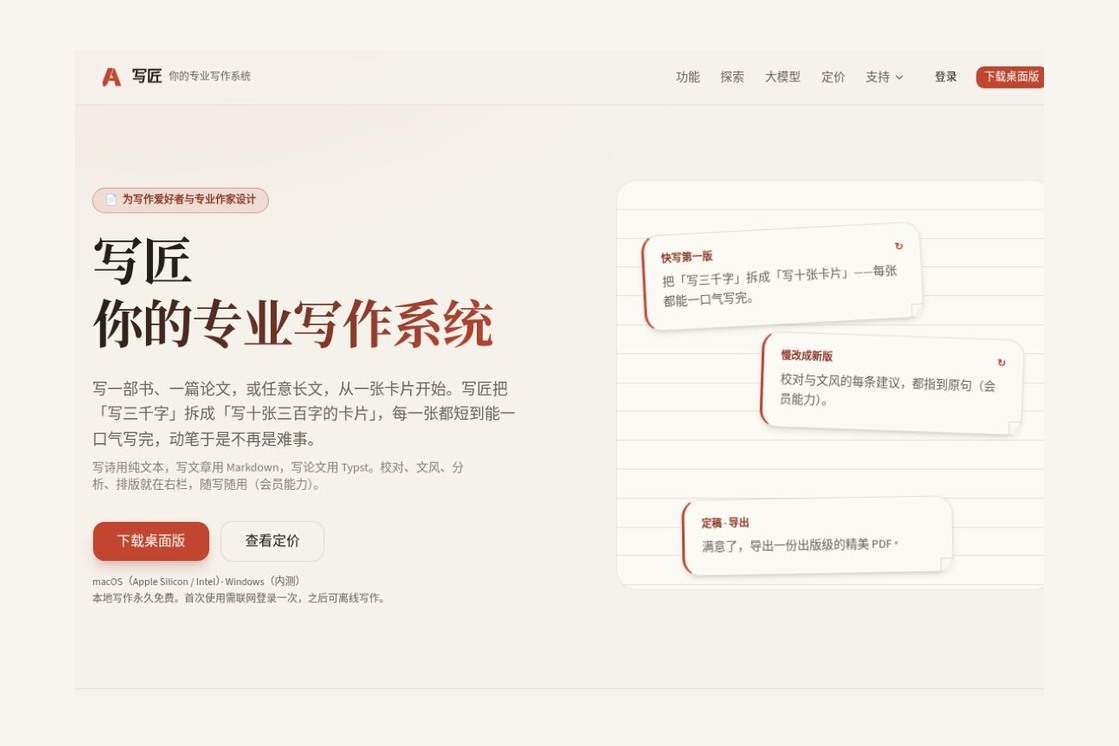
A desktop writing app that organizes long-form content using cards, featuring Chinese AI editing, Typst formatting, and multi-format export; local writing is free.
 AIWriter
AIWriter is a desktop writing application that organizes long-form content using cards and supports both Chinese manuscript editing and final document formatting. It is ideal for those who are compiling materials, writing books, drafting theses, or producing articles on an ongoing basis: users can start by completing short paragraphs one by one, then reorganize the structure and review the wording, and finally export a deliverable document. The software is developed by Living Water AI Lab (42ailab). Local writing and exporting are free, while the AI assistant and cloud backup are available through a subscription.Visit the Xiejiang website
Xiejiang saves a writing project in a local folder, with each card corresponding to a text file. Authors can start by writing the parts they’re confident about, then break them down, piece them together, and reorder them—without having to write from Chapter 1 all the way to the end. It supports plain text, Markdown, and Typst, covering everything from everyday articles and literary writing to documents containing equations and references. For readers, the most noteworthy feature is that source material, body text, revisions, and formatting can all remain within the same workflow—rather than the speed at which an article is generated in a single pass.Official Feature Description
The development team, Huoshui AI Lab, was founded by Yang Zhiping and focuses on research that combines cognitive science and artificial intelligence. Xiejiang’s official brand story traces the project back to a tool concept in 2013 and documents the formation of the first team in 2016, the launch of the web version in 2020, and the release of the new version on September 19, 2026. The current product emphasizes that authors complete the writing themselves, with AI assisting in proofreading, analysis, and formatting. While an earlier version existed as a web-based application, this does not mean that the current account website functions as an online editor.Team Website,Brand Story
The card list makes it easy to view and adjust the structure, card editing is ideal for focusing on a single segment, and card stitching is used for reading through continuous text. Long paragraphs can be broken up, and scattered material can be combined. For topics involving a large volume of material, it’s easier to manage by first organizing arguments, case studies, and interview excerpts separately, then deciding on their order—rather than constantly cutting and pasting within a single long document. Existing folders can also be imported as projects.Getting Started Quickly
Different cards can use different formats: use TXT when no markup syntax is needed, use Markdown when structured headings and lists are required, and leave complex formulas and layout to Typst. Export options include PDF, EPUB, Word, Markdown, Web, Typst, and LaTeX, catering to the needs of printing, digital reading, submitting to editors for review, and further typesetting. The Web export also offers a WeChat Official Account layout, but exporting a file does not mean the platform will publish it on the user’s behalf.Format and Export Instructions,Export Operations
The Member AI Assistant is divided into four categories. Proofreading focuses on typos, vocabulary, punctuation, and obvious grammatical errors; Writing Style checks for accuracy and conciseness; Analysis evaluates rhythm, imagery, and style; and Formatting generates Typst content according to requirements. Proofreading and writing style suggestions are highlighted directly in the original text, allowing authors to decide on a case-by-case basis whether to accept, modify, or ignore each suggestion. The formatted result can be saved as a new card while preserving the original draft, making it easy to compare the two versions before finalizing the changes.AI Assistant Documentation
Preference settings can store names of people, places, terminology, and confirmed writing conventions, reducing the burden of repeatedly handling similar suggestions. Analysis provides useful editing cues but cannot replace editorial judgment; literary expressions, technical terms, and factual citations still require review by the author. For those who do not wish to upload their main text to the cloud, members can configure a local engine via the 42model; however, the local and cloud versions do not offer exactly the same functionality.Preferences and Engine Description
The free version offers keyword search, while the paid membership adds semantic search and “Ask Xiao Wen.” The latter can answer questions based on existing cards and provide sources, making it ideal for retrieving old material or checking how a particular topic was previously expressed. Writing Statistics is a free, locally processed feature that allows you to monitor metrics such as characters, words, syntax, and paragraphs; it is not the same as the paid AI analysis.Search and Chat Features,Notes on Writing Statistics
The above are workflow recommendations based on functionality and do not guarantee writing results. If your goal is simply to enter a single sentence and generate marketing copy in bulk, WriteCraft emphasizes that a writer-led approach may not necessarily be the most convenient option. If you need multiple colleagues to edit a document collaboratively in real time, you should first clarify your collaboration requirements rather than assuming that cloud backup automatically equates to a collaborative document system.
Basis for Action:Download and Installation Instructions,Official Quick Start Guide,AI User Guide.
The official retail prices are as follows. Prices in RMB are subject to the account page at the time of purchase.Official Price
| programmatic | prices | Monthly Cloud AI Quota | Cloud Backup | Key Differences |
|---|---|---|---|---|
| Free | free (of charge) | not have | not have | Local writing, card organization, version history, export to seven formats |
| Pro | 199 yuan/year | 100 points | 10 GB | Membership features such as AI assistants, semantic search, and local search engines |
| Pro+ | 499 yuan per year | 420 points | 42 GB | Increase the quota and capacity; Xiao Wen searches the internet 42 times a day, or 420 times a month. |
1 point equals 10,000 tokens and cannot be directly converted into a fixed number of articles or Chinese characters. Monthly bonus allocations do not roll over, and the quota is shared across multiple cloud-based AI features; point-based top-up packages are billed separately. According to official guidelines, purchases are currently made manually on an annual basis and do not involve automatic billing; after the subscription expires, local writing and export functions remain available. Users who only need writing and formatting export features can first evaluate the free version and do not need to purchase a membership just to retain basic editing capabilities.Billing and Expiration Rules
Source:Platform and Hardware Requirements,Release Notes,Cloud User Terms,Local Engine Limitations.
Local writing files remain on your own computer, but enabling cloud backup will upload an encrypted backup; actively invoking the cloud-based AI will send the selected text, which may be processed by a third-party model service. The official privacy policy states that backup keys are managed by the operator, who has the technical capability to decrypt them; therefore, this should not be marketed as end-to-end encryption that even the service provider cannot access. The company officially承诺s not to use content processed by the cloud AI for model training; separate rules apply to service improvements and model optimization that require additional consent. When dealing with client confidential information, unpublished research, or restricted manuscripts, you should first verify content usage permissions and your organization’s requirements.privacy policy
The following comparison focuses on how the actual products work, without equating “more features” directly with “better.” The recommendations are based on the editors’ judgment, and information on features and platforms is taken from each product’s official website.
| artifact | Content Organization and AI Focus Areas | Platforms and Payment Methods | Needs that deserve higher priority |
|---|---|---|---|
| AIWriter | Cards, Native Text Files, and Typst; Chinese Proofreading, Writing Style, and Formatting Assistance | macOS; Windows: Beta access still needs to be confirmed. Free for local use; AI membership is billed annually. | I write long-form articles myself, while also placing great importance on Chinese copyediting and final layout. |
| Scrivener | Corkboards, outlines, chapters, and research materials are organized in one place; ideal for complex manuscript structures | macOS, Windows, iOS;Purchase a permanent license by platform and major version | Management of fiction or nonfiction manuscripts; looking to use a well-established Windows client |
| Ulysses | Markup editing, text library, writing goals, and proofreading; publish to platforms such as WordPress | Mac, iPhone, iPad; there are other options besides subscriptionsPerpetual License Options | Seamless writing across Apple devices, combining article organization and blog publishing |
| Effie | Outlines and mind maps are linked; AI supports summarizing, outlining, abbreviating, expanding, and continuing text | The official website provides access for computers, smartphones, and tablets; for specific versions, seeDownload Page; Member benefits are subject to the information on the official account page | I’m in the habit of using mind maps to organize my thoughts, and I’d like AI to help generate and expand on the content. |
If your biggest challenge is organizing long documents or constantly switching between editing and formatting, it’s worth trying the free version of WriteCraft first. If your priorities are cross-device synchronization on Apple devices, the full version for Windows, or mind map generation, you should try the corresponding competing products as well. When comparing apps, test importing, editing, and exporting using the same actual document—this provides more valuable insights than simply looking at the number of features.
Yes. The official version lists local writing, organization, and exporting as permanently free features; paid features primarily cover AI and cloud backup. An internet connection is still required for the first login.Official Price
The current product positioning emphasizes author-led writing, with AI primarily used for proofreading, style refinement, analysis, search, and formatting. It is best suited for users who already have source material and specific writing goals; it should not be viewed as a bulk ghostwriting platform.Official Functional Positioning
We do not recommend interpreting it this way. Cloud backup is an additional safeguard and cannot replace local, independent backups of critical documents, export checks, and access control. You should still keep copies of important projects that can be opened independently.
Product images and screenshots from the official website are sourced from AIWriter Official Website, used solely for the purpose of identifying and introducing the corresponding products. All rights to the relevant brands and works are owned by Huoshui AI Lab and other rights holders.


 简体中文 简体中文
  English