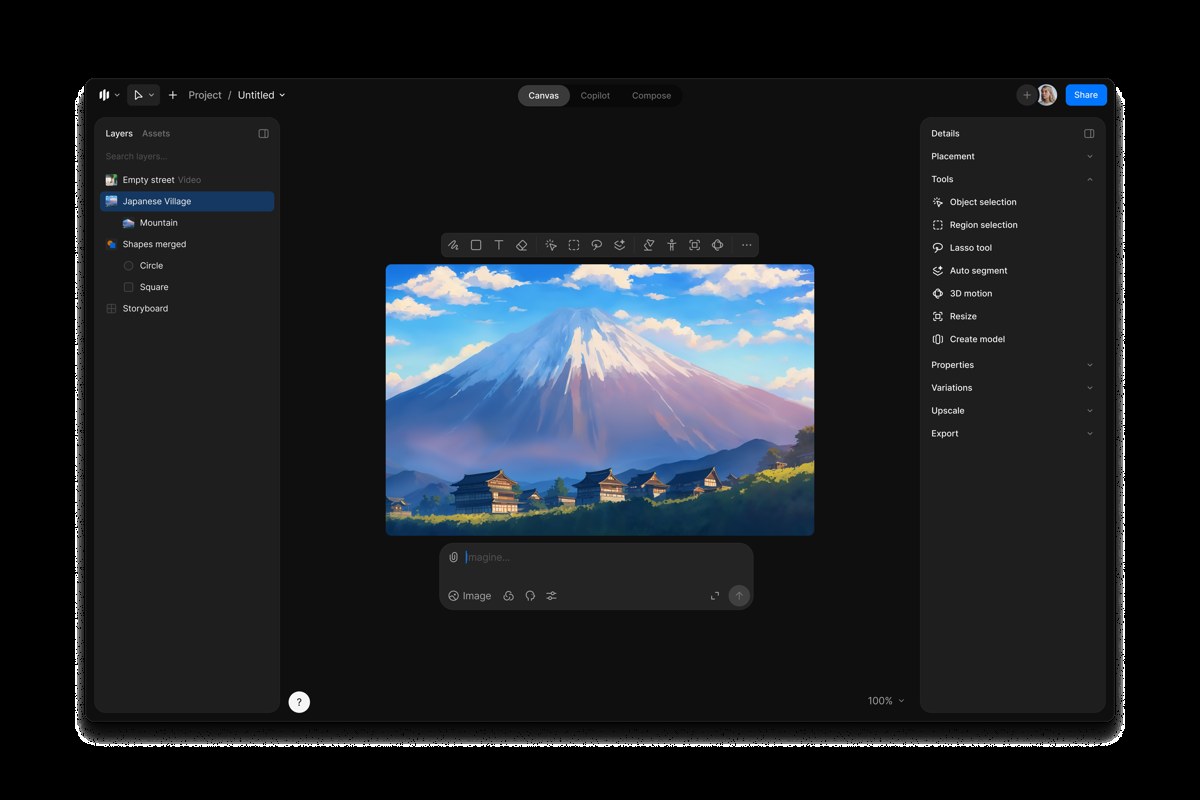
Image source: Morphic official brand resource kit; Canvas interface illustration.
What is Morphic?
Morphic is an AI-powered visual storytelling platform provided by Morphic, Inc. that connects concept development, image creation, animation generation, and content curation. The team is spread across multiple countries, with the official website listing office locations in San Francisco, Bangalore, and Dubai, among others. It is designed for creators, animators, film and television producers, and content teams, focusing not on generating a single image, but on organizing a continuously evolving project centered around characters, scenes, and shots.
core functionality
- Canvas:Organize visual concepts, reference materials, and generated results, and refine the image using tools such as selection, local adjustments, and zoom.
- Copilot Creative Assistant:Explore themes, scripts, and content directions through dialogue, then incorporate those ideas into the subsequent production.
- Compose and Audio-Visual Production:Combining visuals, action, and sound to create a narrative is best suited for building a short film step by step, rather than relying on a single cue to convey all the details.
- Character and Style References:Save and reuse references to help maintain a consistent visual style across different scenarios; however, actual consistency still requires manual verification.
- Reusable Workflows:Provides preset workflows to facilitate repeated production of similar tasks; team sharing and user permissions are subject to the terms of the plan.
What situations is it suitable for?
Independent creators can use it for short videos, story snippets, and animation proof-of-concepts; marketing teams can explore product showcases, event visuals, or advertising concepts; and film and television teams can first create storyboards and shot previews before deciding which concepts to move into formal production. For serialized content, centrally managing reference characters and styles is more valuable than entering prompts from scratch each time. However, when strict motion continuity, precise character performances, or high-end post-production are required, manual adjustments and professional editing should still be factored into the workflow.
How do I use it?
- Go to the official website and open the creation workspace. First, determine your audience, purpose, aspect ratio, and story length.
- Use Copilot to map out your content direction, or organize your existing images, characters, and scene references directly in Canvas.
- Create and edit scenes step by step for each shot; once the characters, composition, and style have been finalized, add movement or sound.
- Organize clips in Compose or the corresponding workflow, and check transitions, pacing, and subtitles; review clarity and media rights before exporting.
Billing Methods and Necessary Restrictions
Morphic offers a free trial along with paid plans such as Basic, Standard, Pro, and Max, as well as an Enterprise plan and credit bundles. The free plan provides limited credits and access to models; generation operations consume credits based on type, and team seats may be billed separately. Please review the options based on your specific tasks.Official Pricing and Points Information...Do not confuse a one-time free trial with long-term, unlimited access.
Free output is not automatically licensed for commercial use:The current English terms clearly state that the use of free, trial, promotional, or other non-paid plans is licensed solely for personal, non-commercial purposes, unless otherwise permitted in writing by Morphic. For commercial projects, please verify the licensing terms for the plans and materials used beforehand. Subscriptions renew automatically; plan credits are reset at the end of each billing cycle and do not roll over; the validity period of credit packages is as displayed at the time of purchase.
Generated results may be incomplete, inaccurate, or unsuitable for direct use, and the model may rely on third-party services. You must possess the necessary rights before uploading others’ works, portraits, or brand materials. The consistency of references and process automation provided by the platform do not constitute a guarantee of final quality or legal compliance.
How do I choose among similar tools?
| artifact |
Main Focus |
Suitable Needs |
| Morphic |
Canvas, Copilot, and Compose: Bridging Ideas and Audiovisual Storytelling |
Developing a creative project centered on characters, scenes, and multiple shots |
| DeepAI |
A Centralized Hub for Generating Dialogue, Images, Videos, and Music |
Quickly try out a variety of generation tasks and explore initial concepts |
| Adobe Firefly |
Image, Video, Audio, and Design Creation and Editing |
Creation, Modification, and Further Design and Production of Visual Materials |
If your focus is on organizing story ideas into a coherent visual project, you might want to try Morphic first; if you just want to quickly test out a few generative capabilities, start by comparing DeepAI; if your work centers on visual design and refining assets, take a closer look at Firefly. You should evaluate these tools using your own task samples, rather than judging their effectiveness based solely on feature lists.
Visit the Morphic website - Official User Guide - Terms of Use



 简体中文
简体中文  English