
Spira Maxima
Combine scripts, product images, or existing voice-over videos to create vertical short videos with subtitles, background music, and motion graphics—perfect for product introductions and regular social media updates.
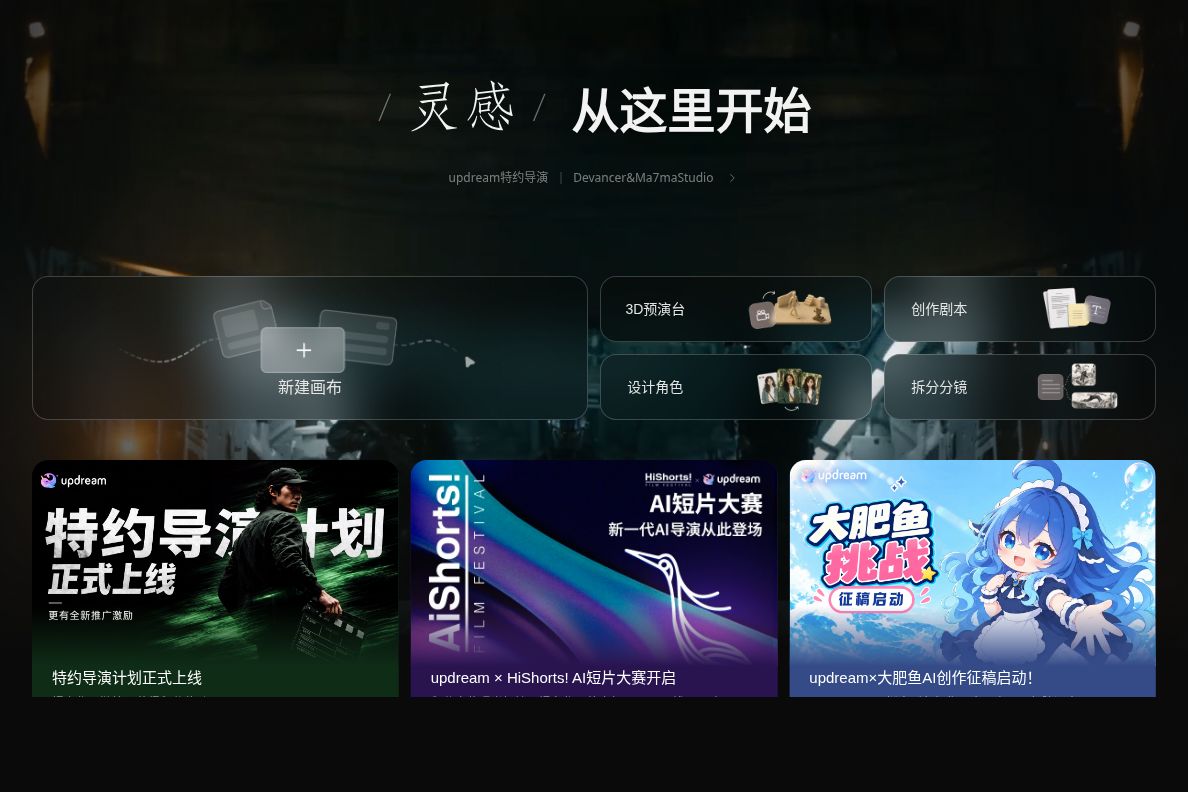
Bilibili’s in-house AI video creation assistant combines a project canvas, script and character design, storyboarding tools, and a 3D preview platform to help content creators and video producers gradually organize their ideas into producible shots and footage.
 UpDream
updream is an AI-powered video creation product developed in-house by Bilibili. Designed for content creators and video producers, it integrates script planning, character design, storyboarding, and the production of image and video assets into a single creative environment. It is well-suited for a workflow where creators first outline the story and then gradually refine the shots. It also provides a 3D preview platform, allowing creators to conduct preliminary rehearsals within 3D scenes. The domestic access point is updream Official WebsiteThe original updream.bilibili.com URL has been redirected to this website.
The official website positions updream as a lightweight, intelligent video creation assistant designed for Bilibili content creators. Compared to a generation interface that simply takes a prompt and outputs a clip, it integrates more preparatory work into the creative process: first defining the plot and characters, then developing storyboards and visual assets. For short video series, animation concepts, and video projects with a continuous narrative, this organizational approach helps focus revisions on specific stages; however, whether it reduces rework still depends on the script, reference materials, and manual review.
You can start from The Creation Portal and Featured Skills on the Official Website's Home PageStart familiarizing yourself with the workflow. The "Call for Submissions," "Model Discounts," and "Reward Points" on the homepage each have their own validity periods; you should not treat any single promotion as a permanent benefit.
If you simply need to quickly generate an image or a standalone video clip, it may be more efficient to use familiar image or video generation tools directly. Updream’s value lies primarily in tasks that require coordinating multiple creative steps; this does not mean that every project needs to make full use of the canvas, skills, and preview panel.
updream provides its services via its website; you must log in to your account to complete creations. The official website displays promotions related to points, as well as limited-time offers for specific models and editing features; the actual point consumption for different tasks, membership benefits, and promotion terms are subject to the rules displayed before submitting a task. A free call to a specific skill does not mean that all subsequent image and video generation will be free; also, do not use limited-time unit prices to estimate the cost of long-term projects.
Accounts, fees, and applicable agreements for domestic services and international access should not be used interchangeably. Before processing unpublished scripts, likenesses, voice recordings, or third-party character materials, you must first confirm the permissions for uploading and use. The official website’s Intellectual Property and User Content Compliance Statement requires that all content entered and uploaded be lawful; the rights to generated content that are legally entitled to the user belong to the user, but do not include the rights of the platform or the model itself. Actual publication or commercial use must also be evaluated in light of platform rules, material licensing, and the content of the work; it should not be interpreted to mean that any generated output automatically obtains third-party rights licenses.
| artifact | Functional Focus | More Suitable Tasks | Things to Keep in Mind When Choosing |
|---|---|---|---|
| updream | The Organization of Scripts, Characters, Storyboards, Skills, and Rehearsal Stages in the Creative Process | Animations, short videos, and series that need to be developed and revised gradually | First, verify the scoring criteria and task specifications; process organization cannot replace quality checks on the finished product. |
| Jiemeng AI | Text-to-Image Generation, Video Generation, First- and Last-Frame Control, and Smart Canvas | Chinese prompt generation, single-clip video editing, and selective image adjustments | The generation capabilities and package benefits displayed on the official website must be verified separately; it cannot be assumed that all features are free. |
| Runway | Cloud-Based Workspace for Image, Video, and Audio Creation and Editing | Exploring the creation, editing, and post-production of multimedia content | The model, package, and budget should be determined based on the specific task; product positioning alone cannot be used to judge effectiveness. |
When selecting a tool, you can have different tools perform the same short task to compare their level of control, modification costs, and the final usable footage, rather than focusing solely on the model name or the speed of a single output. For creators who need to think through their story and shots first, Updream is worth a closer look for its ability to reuse skills and its preview workflow.


 简体中文 简体中文
  English