SolarWinds Avior is a goal-oriented AI agent system designed for enterprise IT, focusing on alert correlation, root cause analysis, and configuration governance. It drives measurable operations goals through risk control, manual approval, and audit trails.
SolarWinds Avior It is a goal-oriented AI agent system designed for enterprise IT environments, released by SolarWinds on October 14, 2026. SolarWinds has been developing IT management and observability software since 1999; Avior is its newly launched standalone application, designed to support enterprise operations processes that require auditable, controlled actions.
To understand this product, focus on “consistently achieving an operations goal.” The team shouldn’t just investigate the cause of an incident once; instead, it needs to ensure that investigation, execution, approval, and verification are seamlessly aligned around that goal. The goal could be to reduce a certain type of alert or to improve the integrity of configuration management, but it should always have measurable acceptance criteria.
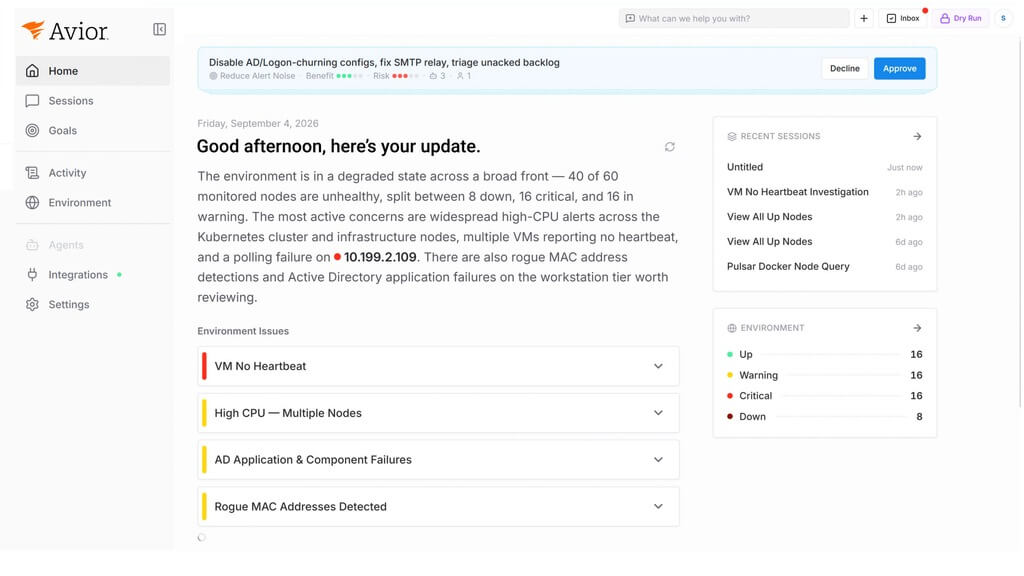
Example of the Official SolarWinds Avior Product Interface
Key Features of SolarWinds Avior
Alert Correlation and Root Cause Analysis:According to the official description, it can correlate events, collect signals, and review change logs and event histories. During actual evaluations, evidence supporting conclusions should be retained, and a distinction should be made between verified causes, candidate explanations, and information that is still missing.
Configuration and Auditing:AnnouncementList uses such as configuration drift, configuration backup, and policy baseline checks. It is recommended to first verify device coverage and baseline quality before setting automation goals.
Risk Classification and Manual Approval:The product emphasizes that high-risk operations require explicit manual approval and must retain an audit trail. Whether a particular step can be executed also depends on the permissions configured by the organization, risk thresholds, and enabled connections.
“The ”Deterministic Execution Framework” should not be interpreted to mean that the system will never make errors. Users must still verify input data, target settings, and the scope of changes, and must separately document the four states—recommendation, approval, successful execution, and business recovery—to avoid substituting a single success notification for a comprehensive validation.
What are the typical use cases for SolarWinds Avior?
Summary of Alerts from the On-Call Team:This approach is suitable for determining how to reduce duplicate investigations when a single issue triggers multiple alerts. During the pilot phase, original alerts should be retained, and events that have been merged or had their priority lowered should be randomly sampled to prevent the dashboard from appearing quiet while overlooking actual failures.
Troubleshooting After the Change:When performance changes occur simultaneously with recent configuration adjustments, the investigation process can be organized around a timeline to gather evidence. In practice, it is important to consider time zones, log delays, and data collection gaps; temporal proximity alone does not prove causation.
Configuration Baseline and Audit Preparation:It is recommended to select a set of equipment and a verified set of standards to first generate a list of deviations, which the person in charge will then review to determine whether the exceptions are valid. Different business systems may have different availability requirements, so it is not advisable to directly apply the same remediation strategy across the board.
Standardization of Routine Maintenance Tasks:For routine checks that are easily overlooked, you can start by establishing inspection schedules, assigning responsible parties, and setting deadlines for follow-up. Processes that are truly worth automating should still clearly explain—even after staff changes—why the checks are performed, how to evaluate the results, and who to contact if a problem arises.
How do I use SolarWinds Avior?
Request a demo or sign up.Currently, Avior is provided through a guided onboarding process. You should submit your request via the application portal on the official website; please do not assume, as you would with a standard free tool, that you can use the full range of features simply by registering.
Define measurable goals.Select a target with a limited scope, and document the current baseline, desired changes, and observation period. For example, reduce the time spent on duplicate investigations while ensuring that no critical incidents are overlooked.
Verify data and permissions.Compile a list of the monitoring, configuration, and event data that needs to be integrated, and confirm account permissions, data retention policies, and how sensitive fields will be handled. Start by covering a small subset of systems to avoid the scope getting out of hand.
Set up approval and recovery procedures.Clearly define which tasks require only read-only access, which allow for suggestions, and which require approval. For operations that may alter the production environment, prepare maintenance windows, validation steps, and designate a person responsible for rollback in advance.
Verify the business results.Verify the quality of the investigation using historical events and low-risk tests, then gradually transition to actual on-duty procedures. In addition to processing speed, you should also check for false positives, false negatives, omissions, and manual rework.
When entering the procurement phase, it is recommended that you confirm with the service provider the authorization methods, integration requirements, scope of support, and actual pricing, and factor implementation and training time into the overall cost. A complete workflow demonstrated during a presentation does not necessarily mean that all of your organization’s existing equipment is supported; you should cross-check each item against your own system inventory.
For cross-regional or Chinese-speaking teams, you should also check whether incident fields, device naming conventions, and ticket languages affect investigation results, and verify network connectivity. We recommend conducting a tabletop exercise: assuming that the agent cannot retrieve data, the approver is offline, or the resolution outcome is unclear, the team should be able to continue handling the incident without relying on the agent, thereby avoiding the creation of new single points of failure.
How does SolarWinds Avior compare to similar solutions?
programmatic
Primary Focus
Key Evaluation Points
SolarWinds Avior
Conducting Investigations and Controlled Actions Aligned with Corporate IT Objectives
Environment Onboarding, Risk Approval, Auditing, and Recovery Verification
Can I create my own operations and maintenance rules, connections, and exception handling?
Current Monitoring and Manual On-Duty Procedures
To be determined by staff and coordinated across systems
Current Baseline, Transition Costs, and Processes That Need to Be Automated First
n8n offers a combination of visualization and code, manual approval, and various deployment options, and can serve as a reference for building your own workflow. However, it is not exactly the same type of product as Avior. Comparisons should focus on practical considerations: who is responsible for maintaining the rules, who handles exceptions, who bears the risk of changes, and how to demonstrate that the workflow has actually improved service performance.
Avior’s value must be tested against real-world operations objectives. For IT teams looking to adopt AI, establishing a reliable baseline, refining authorization parameters, and retaining human judgment before expanding the scope of agent involvement allows both the benefits of automation and the associated business risks to be clearly identified.





 简体中文
简体中文  English