
Shenbi Resume
A resume generation and optimization tool based on AI big model developed independently, providing personalized resume customization and full range of job search services.
Runbear brings shared AI agents to Slack, Teams, and Discord, connecting team knowledge with business tools and allowing users to view tool invocation processes via the Activity feed. It’s ideal for gradually expanding from knowledge Q&A to team workflows.
Runbear It is an AI agent platform designed for team collaboration, provided by San Francisco-based Runbear, Inc. Teams can invoke the shared agent within Slack, Microsoft Teams, and Discord to access authorized knowledge, use business tools, and complete tasks directly within their everyday communication channels.
To understand its value, let’s start with a practical problem: the same business rule is often scattered across documents, chat messages, and support tickets, forcing employees to reach out to different people for confirmation each time. While the shared agent provides a unified entry point, what truly determines its effectiveness is whether the information is accurate, whether responsibilities are clearly defined, and whether uncertain issues can be escalated to the appropriate person in charge.
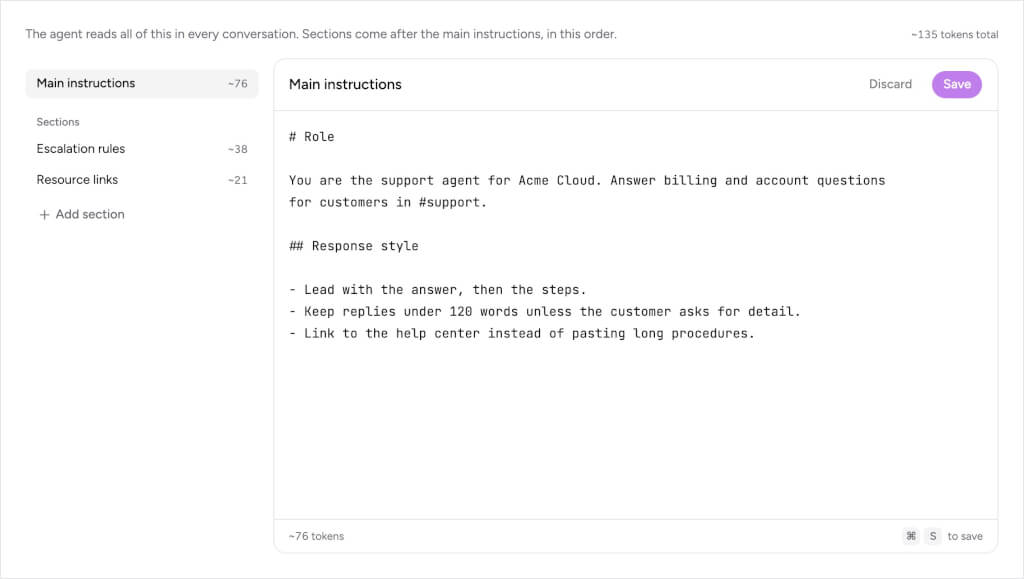
We recommend recording “answer accuracy” and “operation success rate” separately: Identifying the correct policy does not necessarily mean the work order has been successfully updated; similarly, the interface displaying “task started” does not necessarily mean the external system has received the result. When conducting spot checks, review the status of both the source and target systems.
Internal Support Q&A:Suitable for frequently asked questions regarding policies, product specifications, reimbursement procedures, and similar topics. During the pilot phase, select a topic with comprehensive documentation and provide standard answers along with their effective dates; if you encounter outdated documents or conflicting sources, ask the agent to explain the gaps rather than drawing your own conclusions.
Preparing for Client Communication:Workflows can be designed around pre-sales materials, historical issues, and meeting preparation. It is recommended that the output be standardized as “Confirmed Facts, Information Pending Verification, and Next Steps,” while reserving manual review for content that will actually be sent to the client—particularly quotes, refund policies, and delivery commitments.
Interdepartmental Handoff:Teams can also use it to organize requests, fill in required information, and notify the person in charge. First, clearly define the person responsible, the deadline, and the escalation process for exceptions; then consider adding trigger conditions. Automation without clear accountability will only speed up the flow of information—it doesn’t necessarily mean the work will be completed faster.
Costs must be estimated based on usage.The official website offers a way to get started for free without a credit card; as of October 15, 2026,Monthly Payment PlanThe Standard Team plan is $99/month, which includes 20,000 credits and 5 builders; The Business plan costs $399 per month and includes 100,000 credits and 10 builders. It is billed based on usage; “builders” refer to members who create and manage agents and do not equate to the total number of user seats.
When budgeting, we recommend actually running a set of short Q&A sessions and complex tasks to calculate the cost per session, then multiplying that by your monthly requirements. A free trial does not mean unlimited long-term use; you should also determine before launching the promotion whether to enable additional usage and who will receive balance alerts.
We still need to perform reverse permission testing before going live.Prepare materials that are inaccessible to regular members and verify that the agent correctly denies access; then test the agent’s behavior following an employee’s departure, document recall, and connection failure. The fact that the agent responds naturally does not necessarily mean that permission isolation has been implemented correctly. The team should include these exceptional scenarios in the acceptance checklist.
The Chinese team can also include samples featuring abbreviations, mixed Chinese and English, projects with identical names, and speech transcription errors to verify whether the output remains consistent. Network connectivity, performance in Chinese, and the availability of external services should all be validated in a real-world environment before deciding whether to scale up the deployment.
| offerings | Key Entry Points | Prioritize verification during the selection process |
|---|---|---|
| Runbear | Shared Team Agents in Chat Channels | Employees' Current Collaboration Portals, Access Permissions, and Actual Task Expenditures |
| Dust | Company Knowledge, Tools, and Human-Machine Collaboration | Does cross-departmental knowledge organization and proxy governance for knowledge sharing meet the requirements? |
| n8n | Visual Workflows and Code Composition | Process maintenance capabilities, deployment methods, and the cost of handling exceptions |
If a team wants employees to use bots directly in chat, they can start by testing Runbear; if the key challenge involves complex workflow orchestration across multiple systems, they should also evaluate n8n; teams that prioritize corporate knowledge and shared AI workspaces can include Dust in their trial. When comparing these tools, use the same set of tasks and the same permissions, and track the success rate, the amount of manual revision required, and the total cost.
Overall, Runbear’s key appeal lies in integrating AI agents into a team’s daily communication and making it easier to monitor the execution process. By first establishing clear knowledge boundaries and permissions, and then gradually increasing the level of automation, it becomes easier to create a team assistant that can be used sustainably.


 简体中文 简体中文
  English