PixAI What is Same
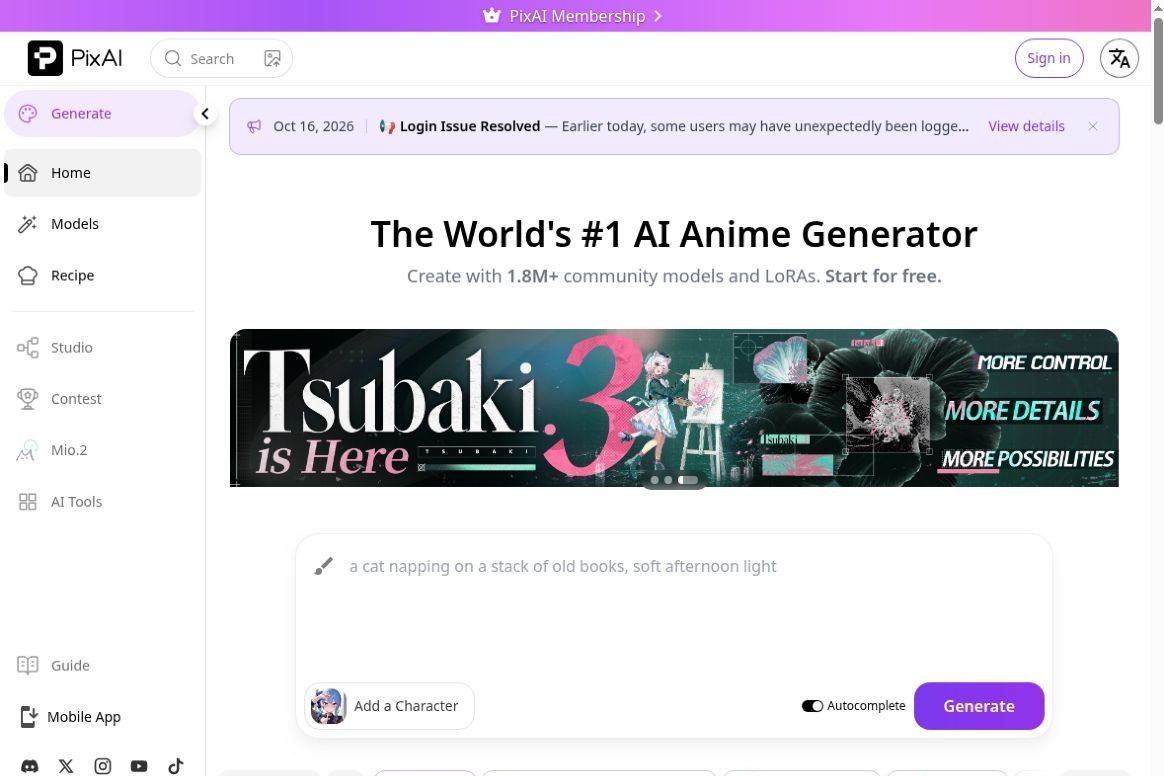
PixAI (commonly referred to as PixAI Art or PixAI.art) is an AI-powered image creation platform focused on anime, manga, and illustration. It integrates text-to-image generation, reference image editing, and a community for models and LoRAs into a single web-based workspace, making it ideal for creating original characters, avatars, scene sketches, and illustrated series. According to the official description, PixAI is developed and operated by the U.S.-based company Mewtant and its Japanese subsidiary, Metanomaly Inc.
Its value lies in lowering the initial costs of anime creation: users can select models, enter descriptions, and continue making adjustments without first having to purchase a graphics card or set up a local development environment. For those who need to consistently maintain a character’s design, the combination of models, reference images, and LoRA offers more value than simply entering a single prompt.Official Description
core functionality
- Text-to-Animation Illustration:Generate images based on descriptions of characters, actions, scenes, composition, and style, with support for adjusting the model, dimensions, and generation parameters directly in the browser.
- Original Characters and LoRA:Browse community models, select a character or art style LoRA, or train your own LoRA using your own compliant assets. Models are not interchangeable across different architectures; be sure to check compatibility and creator licenses before selecting one.
- Reference images and partial edits:Image-to-Image is used for a complete redraw, masks are used to specify local modifications, and brushes provide color hints. Making local corrections is better suited for preserving a composition you’re already satisfied with than regenerating the entire image.
- Visual Improvements:With tools such as scaling and detail restoration, you can continue refining your initial draft; high-quality settings and additional tools typically require more credits.
- Membership Expansion:Member benefits include more points, faster generation, video generation, and select advanced editing features; the specific features available vary by plan.
In September 2026, the official documentation was updated to include Tsubaki.3’s model capabilities, color palette features, and prompt templates. When using the new model, please refer to its specific instructions and do not directly copy prompt conventions or parameters from the old model.Product Documentation,Image Editing Instructions
What Tasks Is It Suitable For?
- Original Character Design:First, explore the character's appearance, clothing, and color scheme, then gradually refine the character's features using reference images or LoRA.
- Early Days of Comics and Stories:Create character designs, mood boards, and storyboard references to help establish the visual direction; precise layout, fluid motion, and consistency in details still require manual work.
- Images provided by the content creator:Explore illustration options for personal channels, social media content, or feature articles, but be sure to verify the relevant rights before using existing anime characters or trademarks.
- Learning Generative Art:Understanding stylistic differences through community models and publicly available parameters is more targeted than repeatedly stacking generalization prompts.
How to Get Started
- show (a ticket) PixAI Official Website, log in using your own account. If you already have an account, please continue to log in using your original method. The official notice states that logging in with the same email address using different methods may result in the creation of separate accounts.
- Claim the daily points available in your account, then go to "Generate." The first time, select one model; there's no need to stack multiple LoRAs at once.
- Clearly specify the subject, action, setting, composition, and style. For example: “An original adult character wearing a blue coat, walking down a city street after the rain, in a half-body shot with soft nighttime lighting.”
- Generated after checking the points required for this task; first evaluate the overall composition, then use masks, reference images, or local editing to address any issues.
- Before downloading, check the character details, text, copyright, and intended use; choose to publish publicly only when you need to share the content, and confirm the visibility settings for the prompt and parameters.
We recommend that beginners change only one key factor per round—such as the model, prompt, or reference strength—to make it easier to determine which modification is having an effect.Official Quick Start Guide
Costs and Access Requirements
PixAI uses a combination of free credits, paid memberships, and credit bundles. According to the official credit guidelines, non-members can earn 10,000 credits by logging in daily; this does not represent a fixed number of free images, as the model, dimensions, batch size, priority, and additional tools all affect credit consumption. Tasks such as LoRA training, image editing, and video processing may also use credits.
Memberships offer higher point limits and premium features. Before making a payment, you should verify the amount, currency, taxes, auto-renewal method, and platform differences on the account purchase page. The management interfaces for web-based and app store subscriptions differ, so it is not advisable to directly apply web-based promotions to the mobile app.Earning Points,Points Used,Member Benefits
The website is compatible with desktop and mobile browsers and also offers iOS and Android apps. An account is required to generate and publish images; the current Terms of Service require users to be at least 18 years old. Access and app store availability in specific regions are subject to local availability.
How to Choose Among Similar Tools
| artifact |
Main Focus |
More Suitable Tasks |
Please note |
| PixAI |
Anime, Characters, Illustrations, and Community Models with LoRA |
Original Character Design, Anime and Manga Style Practice, Illustration Iteration |
Model compatibility, integration costs, and asset licensing must be checked item by item. |
| OpenArt |
Integrated creation of images, video, and audio, including tools for multi-scene video and character consistency |
Creators who want to expand their work from images to video or brand content |
The plan and subscription tier determine the cost; current terms limit commercial use rights for generated content to the Plus plan and higher. |
| SeaArt AI |
Images, Videos, Models, and a Creative Community |
Users who want to explore workflows across multiple models, effects, and community creations |
The terms of use for different models, templates, and community-created works should not be conflated. |
You can start by considering your deliverables: If your primary outputs are anime characters and illustrations, try PixAI first; if you need to combine characters, images, videos, and audio into a cohesive piece of content, compare it with OpenArt; if you prioritize community-driven models and exploring a variety of visual effects, add SeaArt AI to your shortlist. This comparison focuses on workflow priorities and does not represent a ranking of image quality based on the same prompt.OpenArt Product Description,OpenArt Terms of Use,SeaArt AI Official Website
Restrictions You Should Be Aware Of Before Use
- The generated results need to be filtered:Errors may still occur in the consistency of characters' hands, clothing structure, on-screen text, and scene continuity; therefore, the examples shown on the platform should not be regarded as results that can be achieved every time.
- This does not mean that a copyright license is automatically granted:PixAI does not claim ownership of user-generated images, nor does this imply that rights issues related to third-party characters, trademarks, reference images, or models are automatically resolved; the use of community content is also subject to the licenses provided by the creators.
- Distinguish Between Public and Private:Creating, saving, and publishing to the community are separate steps. Do not use unpublished client materials, images of people you do not have permission to upload, or confidential designs directly as reference images.
- Content Rating Still Has Its Limits:The platform distinguishes between general and sensitive content and has moderation and visibility restrictions in place. General content creation and the display of works should remain appropriate for their intended audience; content settings should not be used as a means to circumvent moderation.
- Cloud-based tools have dependencies:Use is subject to network connectivity, account status, credit limits, and service availability; for projects requiring long-term maintenance, compliant source materials and final deliverables should be stored separately.
Overall, PixAI is better suited as a workspace for conceptualizing, generating, and editing anime characters and illustrations. It can shorten the process from description to visual draft, but creators must still take responsibility for making trade-offs in character design, reviewing their work, and ensuring the quality of the final deliverable.PixAI Terms of Service,Content Guidelines



![FLUX.2 [klein]](https://www.aifun.cc/wp-content/uploads/2026/01/20260116222022-ddbc1.png)

 简体中文
简体中文  English