
ShangTang RuYing
ShangTech launched the AI Digital Human Video Generation Platform to provide high-quality and low-threshold digital human video creation services.
Jockey is TwelveLabs’ video AI agent, capable of retrieving, analyzing, and organizing content across video and image libraries, and integrating with Claude, ChatGPT, or via API. Here’s a detailed look at the official version’s features, the latest pricing, use cases, and limitations.
The more footage you have, the more time it takes to find what you need. You might remember a great quote from an interview or a shot you filmed that would be perfect for the opening sequence, but you might not remember the file name, date, or exact time. Jockey is designed specifically for this kind of work: it lets users ask questions in natural language, then return to the corresponding clips to review and select the right ones.
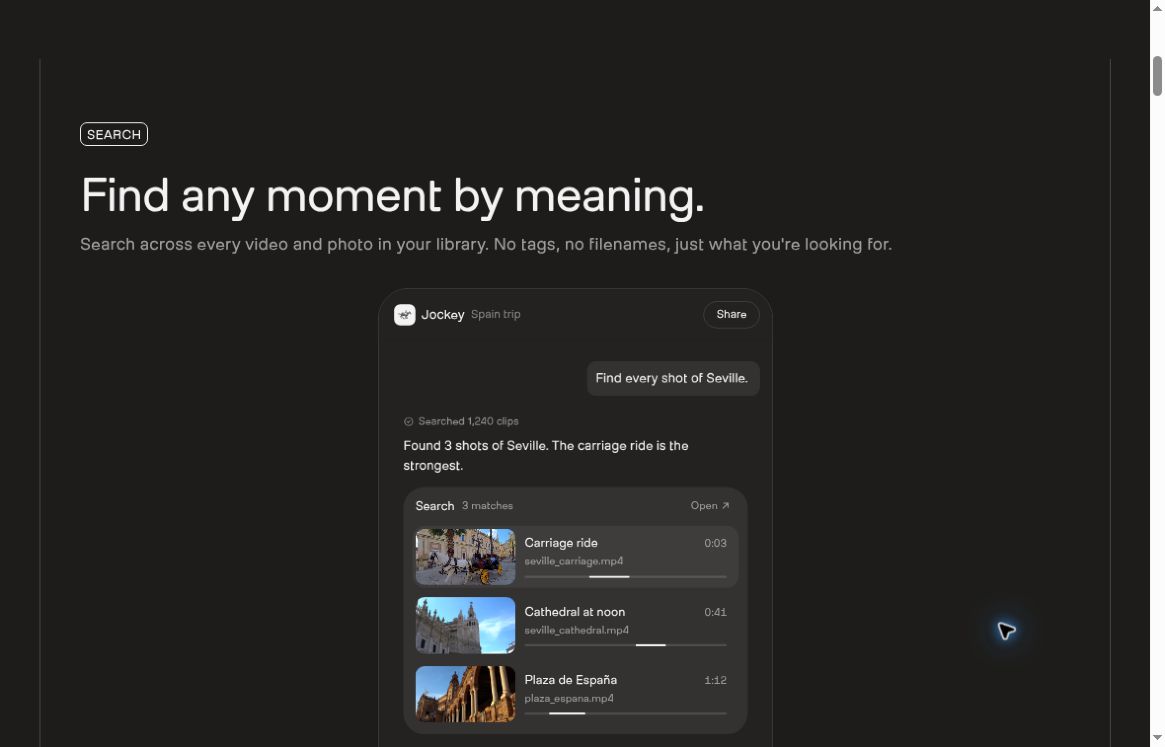
Jockey is a video-smart agent launched by TwelveLabs that enables the retrieval, understanding, and organization of video and image collections. It integrates the capabilities of underlying models into a workflow that supports continuous questioning, providing both creator-focused connectivity and development APIs.Official Product Page
The startup TwelveLabs specializes in video understanding technology; according to its official description, its founding team brings backgrounds in linguistics, video, machine learning, and perception research. The company’s CEO and co-founder is Jae Lee. Jockey, along with the company’s Marengo and Pegasus products, forms a video intelligence technology stack: the former focuses on finding relevant content, the latter on understanding content, and Jockey is responsible for coordinating tasks.Company Profile.;Company Press Release
The official release notes list July 15, 2026, as the Research Preview release date and October 15 as the general availability date. Therefore, October 15 marks the official release date for this cycle and should not be described as “Jockey’s first appearance.” A unified new billing plan was also implemented on that date.Official Release Notes
Jockey supports analyzing the entire knowledge store (a collection of materials that can be searched collectively), maintains context across multiple conversation rounds, and returns structured results according to a specified JSON Schema. This eliminates the need for users to re-describe the task context each time and allows developers to pass the results on to business systems for further processing.Skill Description
For non-technical users, you can think of the knowledge base as an “AI-readable project resource box.” For example, you might first find screenshots of customers using the product, then ask the AI to organize them by different scenarios. This is an example of task design and does not imply that actual testing was conducted for this article.
This official release includes in-dialogue scene previews, precise control over clip boundaries, and timeline trimming and reordering. Users can first let the system organize the clips, then modify them based on their own judgment, and finally export an MP4 file or share the analysis results along with the source material.Release Notes for the Official Version
It’s important to distinguish between the product interface and the underlying API. The official “Highlights Collection” API example returns video identifiers, start and end times, and editing suggestions; it does not directly render a finished video. When integrating such APIs into a self-built product, you’ll also need editing tools or a media processing workflow.Highlights Compilation: Development Examples
The official website lists ad tags, opening clip recognition, identification of on-screen personalities and brand logos, and format and trend analysis as marketing use cases, and also demonstrates the platform’s ability to link content to creators, view counts, and engagement data. While these features are useful for organizing creative assets, view or engagement metrics alone cannot directly prove that a specific clip drove conversions; attribution must still be evaluated in conjunction with campaign parameters.Marketing Features Overview
The following are usage recommendations based on functional positioning, not the results of efficiency tests.
Its value should be determined based on whether the found footage is usable, whether the source is properly cited, and whether the review process is straightforward. If you only need to do some simple trimming on a single short video, it might not be worth the effort to set up a media library and wait for processing.
The official getting-started documentation confirms that a connection via MCP can be established without writing any code; the Connect upload page supports selecting files from both local storage and Google Drive. The documentation specifies that the upload limits for this method are 5 GB for videos and 32 MB for images; these limits should not be confused with the limits of the underlying service.MCP Getting Started Guide
Suggested Evaluation Questions: Please identify clips from this media library that actually demonstrate the product, and list the start and end times, the content of the demonstration, and the reasons for selection for each clip; where there is insufficient evidence, please clearly state so.
As of October 17, 2026, the official pricing page lists the following monthly payment plans in U.S. dollars: Free, which includes 3 GB; Plus, $29 per month, which includes 50 GB; Pro, $99 per month, which includes 200 GB; and Enterprise, priced on a custom basis. Each tier also comes with different workload usage limits; storage capacity should not be interpreted as an unlimited number of analytics runs.Official Pricing Page
The new plan separates the management of media hosting and processing from that of task execution. The Free and Plus plans do not offer overage allowances; the Pro plan allows overage billing, which is disabled by default. When the quota is reached and no overage is permitted, the request will fail.Explanation of Limits and Overages
The migration timeline for existing users varies depending on their current plan; not all paid Jockey subscriptions will automatically have their prices adjusted on October 15. Therefore, do not use the prices and daily call limits listed in the old preview article to determine the benefits of your new account.Invoice Transfer Instructions
The above is a comparison of positioning; it is not a ranking based on testing the three tools with the same content.
There are discrepancies in the official statements regarding link imports. Press releases frequently reference content from social media platforms, but the current operating guidelines clearly state: Public YouTube links may be used directly, but shared links from TikTok, Instagram, or Google Drive may not be scraped directly. When encountering these sources, you should use the upload portal and first confirm usage rights; do not promote “social media analysis support” as meaning “any link can be imported.”Official Link Tutorial
The identification and interpretation still need to be verified. Finding a similar scene does not necessarily mean the person’s identity has been confirmed, and summaries of the content may omit contextual details. Before publishing, you should review the clip to ensure that the editing has not altered the original meaning.
This is the cloud-based asset workflow. For unpublished videos, employee information, and other restricted content provided by clients, the necessary authorizations and data processing assessments must be completed first. During the testing phase, priority should be given to using in-house materials that do not contain sensitive information.
This article does not include any actual performance tests. The accuracy of Chinese character recognition, the processing time for long videos, the quality of complex cross-database queries, and network access conditions in mainland China cannot be considered verified based on this information.
What makes Jockey particularly noteworthy is how it integrates “library search, continuous analysis, and clip reuse” into a single workflow. For teams that have a large volume of video assets but struggle to find suitable clips, it offers a clear path for evaluation. It’s a more prudent approach to first use a small-scale test to familiarize yourself with the assets and evaluate hit rates, usage, and costs before deciding whether to expand the scope of imports, rather than subscribing based solely on a demo.
Official Website:Jockey - User Guide - prices
Date of information verification: October 17, 2026. This article is compiled based on publicly available official information and does not constitute an endorsement based on personal testing; prices, features, and access points are subject to further changes.


 简体中文 简体中文
  English