What is Flowith?
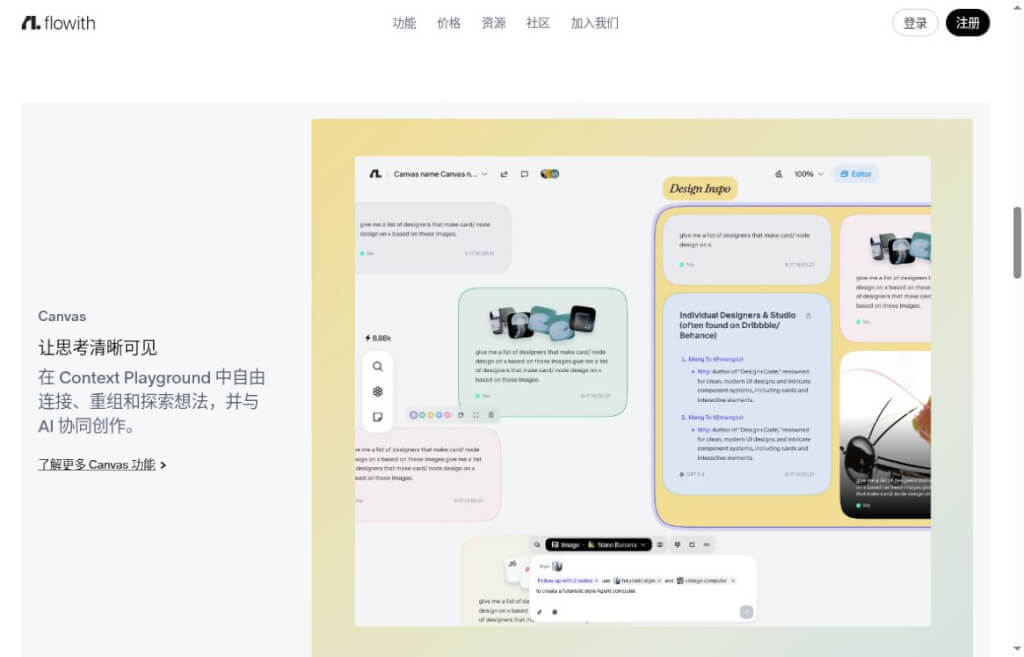
When working on complex projects with AI, a single answer often leads to several different directions: you continue researching, compare different approaches, and need to keep track of ideas you’ve already approved. Flowith is an AI workspace centered around a node-based canvas, allowing these branches to be organized and advanced within a single view. It combines Canvas, Agent Neo, and Knowledge Garden to connect thought, knowledge, and the creative process.
It’s ideal for content-based work that involves a large volume of research materials and requires multiple rounds of refinement—such as planning topics, comparing product proposals, or organizing course outlines. You can set milestones based on different objectives and then select the context to carry over to subsequent tasks, reducing the burden of repeatedly searching through long conversations.
Key Features
- Node Canvas:Connect and reorganize ideas, conversations, and generated content within a visual space—ideal for exploring multiple lines of thought simultaneously while tracking their individual progress.
- Multi-Model Creation:Choose from the models provided by the platform for text and image tasks. The available models are updated regularly, and the actual selection depends on your current account and plan.
- Agent Neo:Carry out multi-step creation and execution around more complex goals, keeping materials, tasks, and results within the relevant workspace.
- Knowledge Garden:Compile and organize knowledge resources so that future Q&A sessions and content creation can draw on existing context; this approach is well-suited for thematic projects that involve gradual accumulation.
Core Value: Understanding the Different Branches of a Project
Flowith is particularly useful in scenarios where you need to keep track of tasks across multiple threads simultaneously. For example, when preparing material for a feature article, you can research the background, user problems, and case studies separately, then merge the verified content into the writing node. This makes it easier to see the relationships between different approaches and allows you to return to a specific branch to make further adjustments.
Using multiple models does not automatically mean the answers are more reliable. A more effective approach is to define tasks and inputs for each node, connecting only relevant data to avoid distractions caused by excessive content. While the official website continuously updates its text and image models, when selecting a tool, you should focus more on whether the canvas suits your work habits and whether the results are easy to verify and reuse.
How to Use: Break a Task Down into Clear Steps
- Clearly describe the deliverables:Determine whether the final deliverable will be an article, a research outline, a proposal, or visual materials, and specify the target audience, scope, and format.
- Breaking Down Task Milestones:Separate data collection, analysis, proposal development, and final product preparation, and assign a clear, easily measurable goal to each milestone to determine whether it has been completed.
- Provide the necessary context:Retain useful information and confirmed conclusions so that subsequent nodes can use them; when conflicting facts arise, refer back to the original sources.
- Comparison and Convergence:Compare the different branches, select the appropriate direction, standardize the wording and format, and then incorporate reusable materials into the knowledge system.
We recommend starting with a medium-sized project to see if managing nodes is easier than handling regular conversations. Model quotas, export capabilities, and task consumption are subject to the information on your account page; please do not interpret “long-task capability” as meaning there are no resource limits.
How do I choose among similar tools?
| artifact |
Focus |
Suitable Tasks |
| Flowith |
Canvas Branches, Multi-Model, and Context Organization |
Exploring Complex Content Projects and Solutions |
| Gumloop |
App Connections, Triggers, and Repeated Execution |
Cross-System Workflow Automation |
| Lovart |
Brand Visuals, Asset Creation, and Minor Retouching |
E-commerce Images and Collection Design |
If you need to clearly organize your research and creative process, check out Flowith; if you need to regularly perform set business steps, take a look at Gumloop; and if your ultimate goal is to complete a set of brand visual assets, Lovart’s design process is better suited for delivery.


 简体中文
简体中文  English