
NetEase Youdao
Focuses on using big data and artificial intelligence technology to provide users with efficient, personalized language translation, online education and intelligent hardware and other education technology services.
An AI workbench for elementary and secondary school teachers, designed to assist with lesson planning, interactive teaching materials, educational research, and home-school collaboration.
 iFlytek Starlight
Official website:iFlytek Starlight
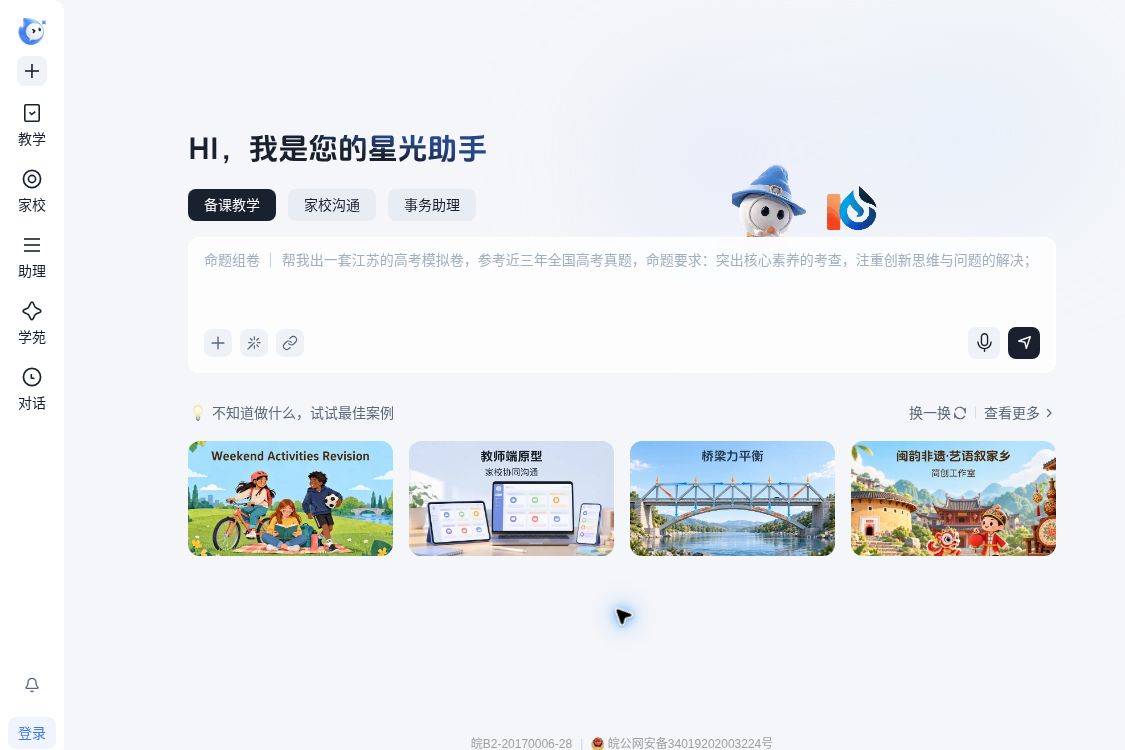
iFlytek Starlight is an AI agent workspace launched by iFlytek for elementary and secondary school teachers, focusing on lesson planning, teaching and research, student performance analysis, and classroom management. For teachers who frequently switch between lesson materials, question banks, notifications, and spreadsheets, what makes it noteworthy is that it integrates these tasks into a single workflow—rather than simply adding another Q&A window. The product was launched on April 24, 2026; the update announced at the Developer Festival on October 22, in conjunction with Spark X 2.6, further demonstrated its ability to generate interactive teaching materials using natural language.Release Overview - Upgrade Instructions
When preparing lessons, teachers can specify requirements based on textbook chapters, instructional objectives, question types, and difficulty levels, allowing Starlight to assist in preparing teaching resources, designing classroom activities, and creating test papers. For topics that are difficult to explain clearly using static images—such as magnetic fields and the Earth’s motion—interactive animations provide a more intuitive demonstration. The official product page also lists features such as PowerPoint-to-H5 conversion, educational mini-games, and classroom interaction data collection—ideal for transforming existing materials into interactive activities with real-time feedback.Product Features
In terms of teaching and research, the AI tutor supports discussions centered on instructional design, helping to break down project tasks and revise course plans. It is well-suited for asking questions such as “Does this activity truly align with the learning objectives?” or “Where might students get stuck?”, but teaching decisions should still be made by teachers based on the specific circumstances of their class. A more prudent approach is to first submit your existing teaching ideas and then have the tool point out any omissions, rather than directly accepting a fully generated draft.
Class teachers can explore the Home-School Collaboration module: The accompanying WeChat mini-program supports homework assignments, notifications, and information collection, and aggregates unread, unsubmitted, or unacknowledged items. The official documentation also describes integration capabilities with Zhixue.com and Smart Classroom; to determine whether existing school data can actually be used, you should first verify account permissions and the school’s deployment status. Do not assume that a product’s support for integration means automatic data exchange between any accounts.Home-School Collaboration and Ecological Functions
| artifact | Focus Areas and Suitable Tasks | Things to Keep in Mind When Choosing |
|---|---|---|
| iFlytek Starlight | Domestic K-12 teaching resources, interactive courseware, curriculum and teaching research, and home-school communication processes | First, confirm that the textbooks are compatible, that the school system is connected, and that account access is enabled; not listed in the standardized price list. |
| MagicSchool | Teacher Toolkit, Quizzes, Writing Feedback, and School Administration | There is a free tier; the Plus plan costs $12.99 per month, or $8.33 per month when paid annually; local course adaptations still require teacher review. |
| Edcafe | Lesson plans, presentation materials, quizzes, and handouts for student-led activities | free floorThere are limits on the number of chatbots, mini-apps, and other features, as well as on the number of participants; features such as data export are subject to the terms of your plan. |
Starlight is better suited for teachers who want to establish a cohesive workflow centered around in-person classroom instruction; if your primary need is to distribute quizzes to students, or if you already have an established teaching platform, you should also compare how well individual tools actually fit your needs. Subscription prices, free quotas, and activation requirements are subject to in-product descriptions or official confirmation; public descriptions do not provide uniform standards. Generation speed is no substitute for teaching quality: Try it out in one class first to confirm that the content is accurate, the system operates reliably, and it genuinely saves time before expanding its use.


 简体中文 简体中文
  English