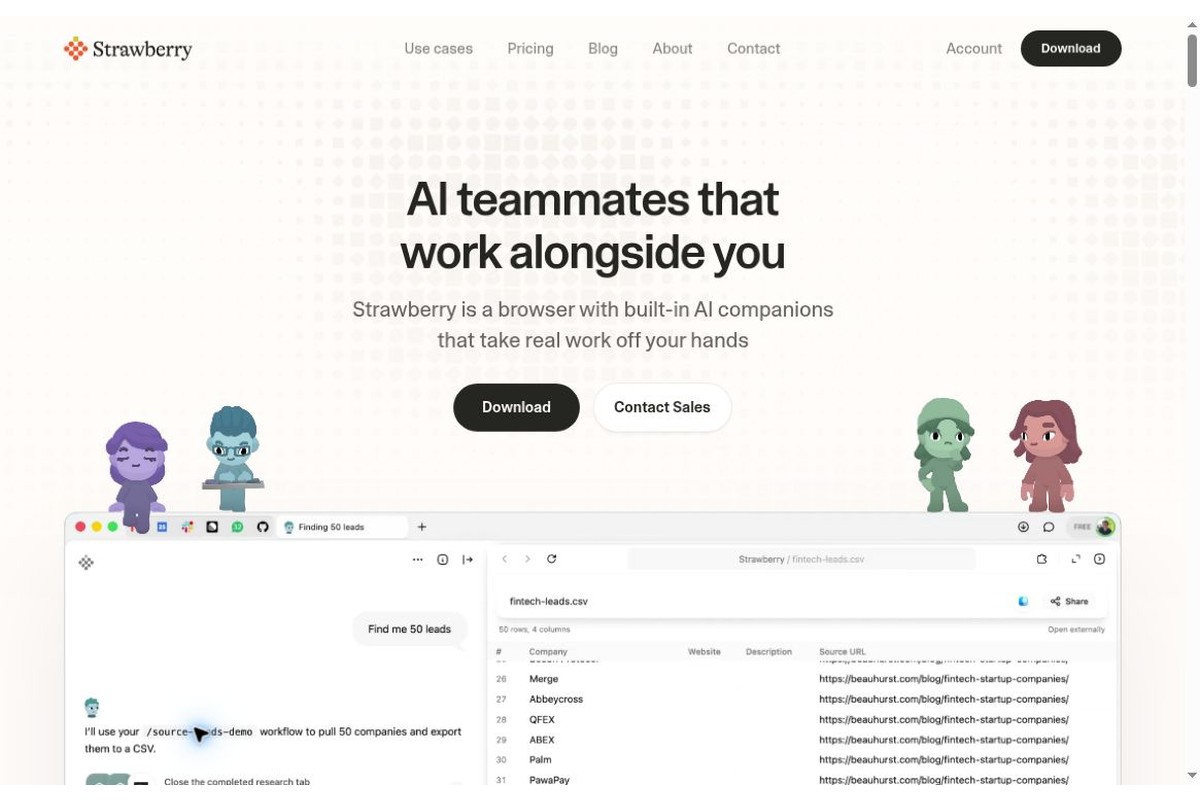
Strawberry is a desktop browser with built-in AI companions, designed for people who frequently work with web pages, emails, customer data, and meeting notes. Rather than simply answering questions in a sidebar, it enables the assistant to conduct research, organize information, and perform cross-application tasks within the user’s logged-in workspace, transforming the browser into a workspace shared by both humans and AI.
Products and Team
Strawberry 由瑞典斯德哥尔摩团队开发,官方列出的创始人为 Charles Maddock、Arian Hanifi 和 Sebastian Thunman,提供 macOS 与 Windows 下载。2026年10月26日发布的 1.0 重点更新助手形象定制、九种预设角色和 Companion Plaza;会议整理、定时任务、Chrome 扩展支持等能力此前已经陆续推出,并非全部首次出现在 1.0。
Key Features
- Organize assistants by job role. You can choose from preset roles such as sales, recruitment, or research, or you can create your own Companion. The tasks assigned to each role and its work preferences must be specified step by step; “remembering preferences” does not mean that the Companion automatically knows all of the company’s rules.
- Perform web-based tasks in a browser. It's ideal for collecting potential customer information, researching candidates, compiling information on competitors, and other tasks, reducing the need to repeatedly copy content between web pages and chat windows.
- Connect work apps and files. The official list includes integration capabilities with Gmail, Slack, Notion, and others, and supports reading, editing, and creating files in user-selected local folders.
- Centralized management of meetings and outcomes. The meeting page organizes recordings, transcripts, summaries, and action items; the Library stores projects and files. It can also generate visual outputs such as presentations and infographics.
- Let repetitive tasks occur at a steady pace. Routines can trigger tasks based on time or app events, such as organizing your inbox in the morning or drafting a reply after receiving an email from a client.
Core Values and Suitable Scenarios
It’s best suited for tasks where “work is spread across multiple web pages but doesn’t warrant developing a separate system”: sales teams can first screen target companies, then organize contacts and draft communication messages; recruiters can gather candidate information based on job requirements; and small teams can turn meeting action items into to-do lists and follow-up materials.
Compared to one-time Q&A sessions, the key value lies in the ongoing context and execution process. However, the ability to interact with a webpage does not guarantee stability across every website or process. Page redesigns, failed logins, CAPTCHAs, or permission restrictions can still bring a task to a halt. When tasks involve sending emails, making payments, deleting data, or submitting information externally, manual verification steps should be included in the task requirements.
How to Get Started
- Download the appropriate system version from the official website and log in to your Strawberry account.
- Start by choosing a low-risk task with a clearly defined scope, such as “Summarize the product positioning of these five companies and include the original links.”
- Choose a preset assistant or create your own role, and connect only the accounts and folders necessary to complete the task.
- Review the sources used by the assistant, the operations to be performed, and the deliverables, and then gradually incorporate them into the scheduled workflow.
- For recurring tasks, specify clear input and output formats as well as termination conditions, rather than simply giving vague instructions like “Just take care of it for me.”
Fees and Usage Restrictions
The official monthly personal plans include the Free tier (500 credits per month), the Intern tier ($20/month or 6,000 credits), the Part-Time tier ($85/month or 25,000 credits), and the Full-Time tier ($250/month or 75,000 credits). Regular browsing does not consume credits; credits are consumed when AI assists with tasks. Plan credits are refreshed monthly and do not roll over; additional credits purchased are carried over according to official rules. Actual consumption depends on the task, so credits cannot be directly converted into fixed working hours.
The browser assistant has access to work accounts and web content; before using it, companies should clearly define which data it is authorized to process and review its access permissions. Meeting recordings must also comply with participant consent and organizational policies. It is better suited as a supervised work assistant rather than an unmonitored entity with business responsibilities.
How to Compare Similar Options
| programmatic |
Primary Focus |
More Suitable Tasks |
Things to Keep in Mind When Choosing |
| Strawberry |
User-Centric AI Browser and Virtual Assistant |
Cross-Web Research, Conferences, and Daily Office Workflows |
Account Permissions, Task Approval, Credits Usage |
| Browserbase |
Browser Automation Infrastructure for Developers |
Build and deploy a web agent for your product |
We need to develop integration and operational monitoring capabilities; this is not intended to directly replace personal browsers. |
If you want to assign tasks directly within your everyday browsing environment, Strawberry integrates more easily into your existing workflow; if you need to embed automation capabilities into your own application, you should prioritize evaluating development platforms like Browserbase. It’s not simply a matter of speed—the two differ in their target audiences and integration methods.
Official Website:Strawberry - Update 1.0 - Pricing - Team and Product Information - Browserbase



 简体中文
简体中文  English