
Feishu Ask
Feishu launched an AI conversational search and quiz tool designed to help users quickly integrate and retrieve knowledge resources within Feishu.
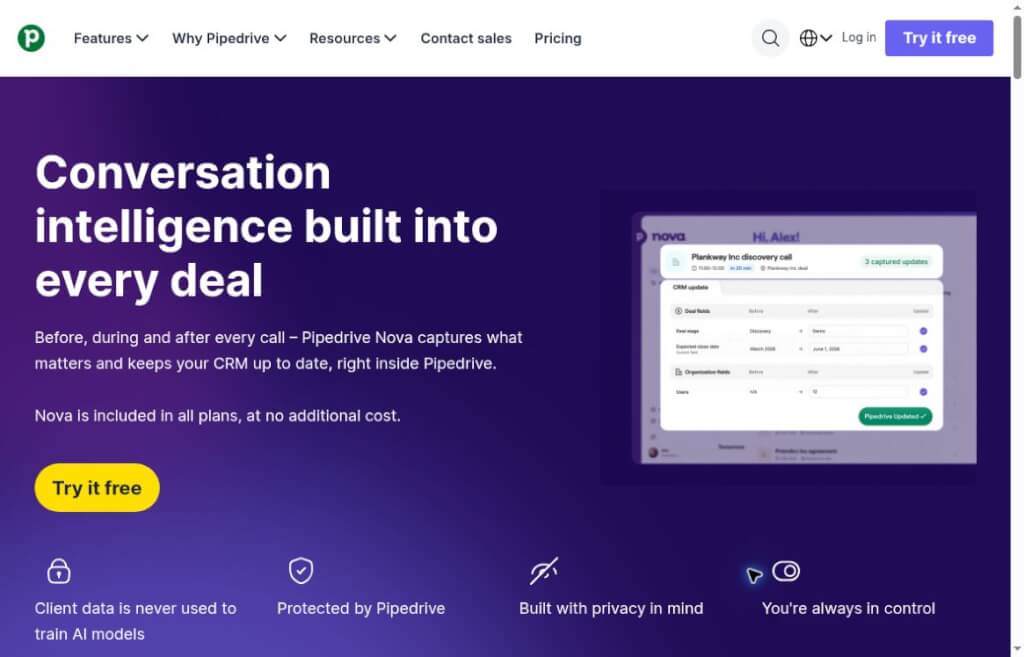
Pipedrive Nova integrates pre-meeting briefings, meeting recording transcriptions, and post-meeting CRM updates to help sales teams retain the details of customer communications. It is included with all Pipedrive subscription plans, and field changes require manual review.
Pipedrive Nova It is Pipedrive’s built-in AI-powered sales meeting tool, covering pre-meeting preparation, in-meeting note-taking, and post-meeting follow-up. It links customer conversations to existing deals, contacts, and organization records, helping salespeople organize new information from meetings into auditable CRM update recommendations.
Pipedrive Founded in Estonia in 2010 by sales professionals, the company has long focused on developing products for sales pipeline management for small and medium-sized enterprises. Nova continues this workflow-oriented approach: after a meeting, teams need not only a summary but also information on the customer’s status, next steps, and how to update the deal record.
groundAnnouncement dated September 16, 2026Nova has officially launched worldwide and is included in all Pipedrive subscription plans at no additional cost. To use it, you must still have a valid Pipedrive account and access permissions; it should not be considered a standalone, permanently free meeting app.
When salespeople attend multiple meetings in a single day, it’s easy for clients“ new schedules, budget changes, and to-do items to get mixed up. Nova is ideal for preparing updates promptly after each meeting. During reviews, distinguish between ”the client has expressed interest,“ ”the client plans to evaluate,“ and ”the client has confirmed the purchase”; do not equate positive statements directly with a commitment to close the deal.
When a client is taken over by a new colleague, or when a project is resumed after a hiatus, a pre-meeting briefing can help quickly review the documented background. The team can further clarify the most recent commitments, unresolved issues, and the next decision-maker, thereby reducing the need to repeatedly ask the client for information they have already provided.
Some customer interactions take place over the phone or in person, and video conference links are not always available. Desktop recording expands the range of situations that can be recorded, but it still requires suitable audio conditions and the participants’ consent. When multiple people are speaking at once, in noisy environments, or when technical jargon is frequently used, you should focus on verifying amounts, names, and dates.
We recommend first testing the entire process with a non-critical transaction: verify whether pre-meeting information is correctly aggregated, whether client notifications are sent properly, whether the transcription is clear, and whether the fields are saved in a way that aligns with your team’s conventions. Validating these steps makes it easier to identify issues than enabling automatic participation for all meetings at once.
It is important to note that Nova’s public documentation distinguishes between meeting notes and changes to existing fields: summaries and transcripts may be added to the record as notes, while modifications to existing CRM data require user approval. Teams should verify both the location where notes are stored and their visibility scope; the phrase “fields pending review” should not be interpreted to mean that no data will be written to the system.
Otter Sales Agent It also provides features for taking notes during sales meetings, creating summaries, and following up, and throughCRM IntegrationConnect to external systems. The main difference between the two lies in which work platform the team uses as their starting point.
| comparison dimension | Pipedrive Nova | Otter Sales Agent |
|---|---|---|
| product pattern | Pipedrive's Built-in Sales Meeting Tool | Independent meetings and sales of AI services, integrated with CRM |
| Conference Outcomes | Briefings, Transcripts, Meeting Recaps, and CRM Update Recommendations | Meeting Notes, Summaries, Action Items, and Sales Insights |
| CRM Integration | Organizing deals, contacts, and organizations in Pipedrive | The official list includes integration solutions such as Salesforce and HubSpot |
| Update Review | Allows you to compare the original value with the suggested value, then approve, edit, or skip it | You must verify the synchronization content and configuration method based on the selected CRM integration. |
| Cost Assumptions | Included in all Pipedrive subscription plans at no additional charge | The activation requirements for the Otter solution and sales integration must be confirmed separately. |
Teams already managing their sales processes with Pipedrive should prioritize evaluating Nova, focusing on testing how well meeting content integrates with CRM fields; teams using other CRMs or those looking to centrally manage meetings across different departments should include Otter in their comparison. When selecting a solution, prioritize your existing systems, review processes, and data governance requirements, and then compare the styles of meeting summaries and the recording experience.


 简体中文 简体中文
  English