
Mapify
An AI tool that can quickly convert documents, web pages, videos and many other contents into mind maps, aiming to improve users' information processing and memorization efficiency.
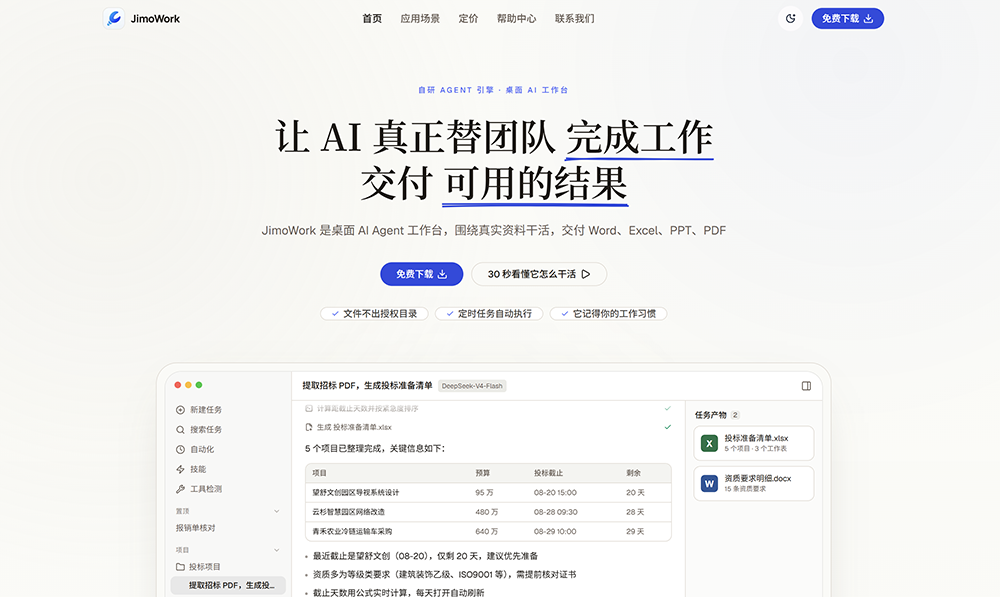
A desktop AI agent workspace that can autonomously break down tasks, invoke tools to process local files, and directly deliver ready-to-use outputs such as Word and Excel documents, helping you automate repetitive tasks.
 JimoWork
JimoWork is a desktop application designed for everyday office tasks AI Agent Workbench. After the user specifies the data and objectives, it can read files, call up tools, execute processing steps, and save the results as documents or spreadsheets that can be used later. For teams that frequently organize data, verify information, and generate reports, its key advantage lies in consolidating multiple steps into a single task, rather than requiring users to repeatedly move content back and forth between multiple dialog boxes and office applications.
The product is part of the JiMo AI ecosystem. The official website and the platform’s privacy policy list the following as the operating entity:Hangzhou Xiaohuodui Digital Technology Co., Ltd.. Version 1.9.0, released on October 21, 2026, introduced online search, transcription of recordings into meeting minutes, and online skill updates.Products - Operator and Privacy Policy - Release Notes
JimoWork supports common PDF, Word, Excel, and PPT documents, and can also process CSV, Markdown, text, images, and certain code files. Users can drag and drop files into a task or select a work directory with access permissions, allowing the AI to extract content, organize fields, analyze data, and then generate new files. The processing capabilities for PDF, Word, Excel, and other formats can be used in conjunction with corresponding skills. It is well-suited for streamlining the process of “reading materials, organizing information, and drafting a first draft,” but complex layouts, scanned document recognition, and formula results still require manual review.File and Data Description
For example, when processing multiple supplier quotes, you can request that they standardize the currency and quoting criteria, list tax-inclusive prices, delivery dates, payment terms, and any missing fields, and then generate a price comparison table. The key here is not simply to compile text, but to clearly define fields, specify details that cannot be inferred, and outline acceptance criteria—thereby avoiding direct comparisons of prices under different conditions. This is a usage recommendation based on functional design and does not imply that the product has previously conducted a procurement review on behalf of the user.
The built-in tools include web page scraping, browser operations, and code execution, which can be used for gathering publicly available information, organizing web content, and data processing that requires scripting. Version 1.9.0 adds the ability to perform direct online searches and displays search results within task steps, making it easy to return to the original web page for verification. For product research, policy summaries, and industry briefings, it is recommended to require that source links and information dates be specified within the task. Search results should still be filtered based on the reliability of the sources and should not be treated as verified conclusions.Tools and Plugins - Release Notes
v1.9.0 supports sending meeting recordings to a transcription plugin, which then compiles them into minutes that include conclusions and action items. You will be prompted for confirmation before uploading a recording for the first time. When using this feature, it is best to request that the transcript distinguish between “decisions made,” “proposals under discussion,” and “issues pending confirmation,” and to verify that names, numbers, and responsible parties have been correctly identified. For recordings involving customer information or internal discussions, you should also first confirm whether your organization permits the use of the corresponding transcription service.Meeting Recording Feature Description
Skills are used to standardize workflows, such as generating weekly reports based on a uniform template or cleaning up spreadsheets according to fixed fields; plugins provide capabilities such as searching, querying, or calling external services. JimoWork features built-in skills and a skills marketplace, and also supports creating custom skills through dialogue or importing skill folders containing SKILL.md files. For tasks that need to be repeated weekly, you can first run through the task once and then save it as a reusable workflow.Skill System
Long-term memory can retain preferences and important context, reducing the need for repeated explanations. However, longer tasks may compress early context, and once compressed, there is no guarantee that every exact phrase will be retained. Key constraints—such as amounts, field specifications, and files that cannot be modified—should ideally be included in explicit task instructions or templates, rather than relying solely on the AI’s memory.Memory and Context
JimoWork allows you to set up recurring tasks and view execution logs, failure reasons, and push results for each execution. It also supports integration with WeCom, Feishu, DingTalk, and WeChat, enabling users to initiate tasks or receive results directly from these messaging apps. To use these integrations, you must first complete the corresponding channel configurations. Please do not assume that “supports connection” means you automatically have access to all accounts and group chats after installation.automation function - Channel Feature Description
Scheduled tasks are not the same as a cloud server that never goes offline. As noted in the release notes, tasks missed while the computer is shut down or in sleep mode will be rescheduled to run the most recent one upon resumption. Therefore, before generating daily reports or processing local data on time, you should check the status of your computer, client, and network connection. Closing a window usually just minimizes it to the system tray; this is not the same as completely exiting the program.Scheduled Task Updates - Operational Status FAQ
The above outlines application scenarios designed with document processing, skills, and automation capabilities in mind. Whether this actually saves time depends on the quality of the data, the standardization of the tasks, the model selected, and the amount of time required for manual review. For one-time, short Q&A tasks, it may not be necessary to set up a full-fledged desktop workflow.
| Charges | Official Public Information | Please note |
|---|---|---|
| Download and Try It Out | The desktop version offers a free download option | This does not mean it is permanently free or unlimited; specific account privileges and usage limits are subject to the actual activation results. |
| Authorization by Seat | 2,000 RMB per person per year | The official website is positioned as a solution for small teams. |
| Unlimited-user license | 65,800 yuan per year | The same as the functions specified in the seat plan; "unlimited users" does not mean unlimited model calls. |
| Model Usage | Calculate based on the selected model and the input and output quantities | You can view this in the consumption statistics; costs vary by model. |
| Cloud Platform Plug-ins | Calls consume your quota and are tracked separately from conversation usage. | Check pricing and licensing information before using external capabilities such as transcription and search |
| Privatization and Customization | Contact us for a separate quote. | The scope of the privatization transfer cannot be inferred from the desktop licensing price. |
The procurement budget should take into account licensing fees, model usage, and plugin costs. The public webpage does not provide a standardized “total monthly price for all tasks” here, nor does it specify a uniform number of free trials; therefore, the annual fee should not be interpreted as granting unlimited access to all services. The final quote, quotas, and scope of services are subject to the terms provided at the time of purchase and the contract.Official Website Price - Model Fees - Plugin Fees
Local processing does not mean that the data never leaves the computer.The official documentation states that files are processed within the authorized directory and are not stored in the cloud on its servers; it also explicitly notes that the data required for model inference will be transmitted according to the selected model provider’s procedures. Cloud-based plugins, such as audio transcription, also involve external processing. Therefore, it cannot be claimed that the system operates entirely offline, nor can the standard desktop version be directly equated with an on-premises deployment.Official Website Data Security FAQ
Before processing customer data, payroll records, contracts, or meeting recordings, it is recommended that you first familiarize yourself with the data paths and storage methods of the actual models and plugins, as well as your organization’s usage requirements. Directory-based authorization addresses the question of “which files can be accessed,” but whether the data is suitable for transfer to an external service still requires separate evaluation. The platform’sprivacy policyThis can serve as a starting point for review, but should not replace a thorough evaluation of specific plugins and enterprise deployment solutions.
The following comparison focuses on publicly stated functionalities and usage scenarios; it is not a ranking based on speed, accuracy, or value for money. There is some overlap in the capabilities of these products, so it would be inaccurate to simply claim that other AI systems are only capable of chatting and cannot deliver files.
| artifact | Primary Working Methods | Priority Requirements | Pre-selection Check |
|---|---|---|---|
| JimoWork | Desktop tasks are executed within the working directory, integrating skills, models, plugins, and domestic instant messaging channels. | Local data processing and reuse of fixed workflows; we would like to receive the results via Enterprise WeChat, Feishu, DingTalk, or WeChat. | Account authorization, computer performance, model and plugin resource usage, data transfer range |
| Claude Cowork | Perform tasks across files, tools, and browsers, and schedule recurring tasks; the team is gradually integrating the chat and Cowork experiences. | I'm already using Claude and would like to handle cross-application knowledge work within the same ecosystem. | Plan and regional availability; according to the official statement, new tasks on the Pro/Max models are executed in the cloud, so the old perception that “all tasks are performed locally” no longer applies. |
| Microsoft 365 Copilot | Collaborate within applications such as Word, Excel, and PowerPoint, and use the Microsoft 365 data and permissions system | Organizational data and day-to-day work are primarily handled in Microsoft 365, and we hope to manage them directly within the existing applications. | Existing subscriptions, Copilot licenses, organization-wide features, and data permissions |
| WPS AI | Provides AI features for writing, presentations, reading, and spreadsheets, including document summarization, Q&A, and formula assistance | I mainly use WPS to write documents, create presentations, or work with spreadsheets, and I’d like to start from a familiar office suite interface. | Specific client-side and AI features; according to the official website, the web version offers only basic functionality. |
Claude's execution environment and plan descriptions are based onMulti-Device User Guideas a basis; for information on Microsoft's feature licensing, please refer toLicense Information. When comparing solutions, you should run a complete task using the same set of desensitized data to evaluate the editability of results, source traceability, review time, and actual resource consumption—this provides more valuable insights than simply viewing a demo page.
Both belong to the same product ecosystem, but they have different entry points and uses. JimoWork is a desktop task management platform that uses a JiMo AI account and accesses models and certain online capabilities through the platform; the JiMo AI main website also provides platform services such as agent building and knowledge bases. Do not confuse the pricing plans or feature sets of the two.JiMo AI Platform - JimoWork Model Integration
The official model documentation states that by selecting a connected model through the JiMo AI platform, there is no need to configure model provider accounts individually. For enterprise-customized integrations, any additional requirements should be determined based on the specific implementation plan.Models and Service Providers
Messaging apps on mobile devices can serve as entry points for tasks, but local file tasks are still executed by the desktop application. If the computer is shut down or put into sleep mode, scheduled tasks may be delayed; therefore, sending a command from a mobile device does not mean the task has been completed on the computer. You can start by initiating a small task to verify that the client is running properly and that results are being returned.
We recommend starting with small tasks that involve “fixed input, clear rules, and easily verifiable results,” such as organizing five anonymized quotes into a table with standardized fields. First, verify accuracy and costs, then gradually expand to weekly reports, meeting minutes, or scheduled notifications. Processes that require a significant amount of discretion, involve sensitive information, or could have external implications are not suitable for being set to unattended mode from the outset.
JimoWork is ideal for teams focused on local files, reusable workflows, and collaboration via domestic messaging apps. It combines file processing, tool integration, skills, and task execution into a single desktop portal, reducing the manual steps between organizing materials and delivering results. The three most important considerations before adopting it are: validate results using real but anonymized small tasks; factor in both licensing fees and usage costs; and confirm what data will be passed to the model and plugins. A workflow that suits your needs is more important than the sheer number of features.
Visit the JimoWork official website - Read the Official Help Center
Product images and screenshots from the official website are sourced from JimoWork Official Website, used solely for the purpose of identifying and introducing the corresponding products. All rights to the relevant brands and works are owned by Hangzhou Xiaohuodui Digital Technology Co., Ltd. and other rights holders.


 简体中文 简体中文
  English