Expand Fetch is designed for AI Agent A web page parsing service for developers. After entering a URL, it converts the page as rendered by the browser into Markdown, while also returning useful hidden JSON data and traceable snapshots—ideal for providing web page context to research assistants, knowledge bases, and automated workflows.
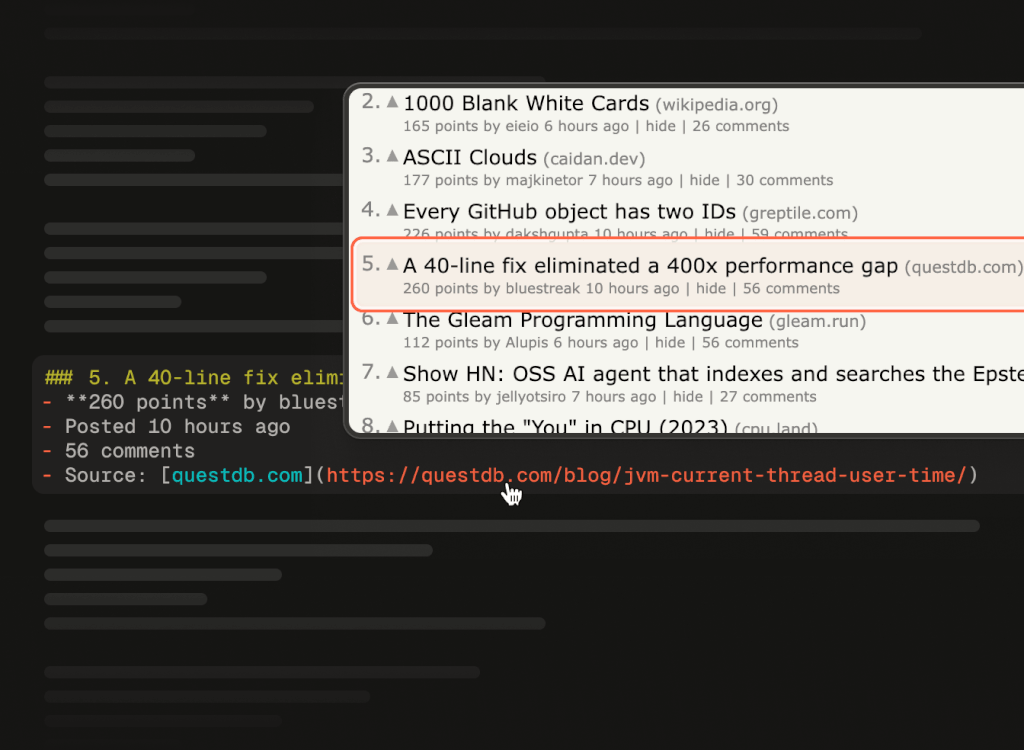
Official product example: Locating cited content in a saved web page snapshot. Source:Official Announcement
core functionality
Preserve page structure:The Iris model reads the rendered page, making every effort to preserve tables, layout relationships, and checkbox icons, thereby reducing the risk of losing semantic information—such as price lists and package comparisons—during the conversion process.
Extracting Hidden Data:X-Ray filters useful information from the JSON loaded from the page and passes it, along with the Markdown, to the Agent.
The answer is sourced from:Each time a snapshot is captured and saved, the text is linked to its source location, making it easier to review and troubleshoot incorrect answers.
Extract the segment based on the question:Highlights returns relevant paragraphs based on a query; Crawl extends crawling to the entire site; WebSync is used to track changes to the website.
What situations is it suitable for?
When developing a research-oriented agent, you can use it to read product documentation, pricing pages, and feature comparison pages; when building a knowledge base, you can convert website content into a unified input; and when verifying facts on public web pages, you can save snapshots and citations to avoid the difficulty of restoring the original sources after the website is updated. If you only need to manually browse a few pages, it’s usually simpler to just open the website directly.
Developers can run the following command via the CLI npx expandai fetch https://example.com, First, check the Markdown output for a single page.
Select "JSON" output when you need the snapshot ID, page metadata, and State JSON; for application integration, you can use the TypeScript SDK, HTTP API, or MCP.
First, use your own sample page to check the tables, icons, and references, and then decide whether to expand to batch scraping.
Team and Latest News
Expand positions itself as an applied research lab; its founder is Tim Suchanek. The company officially launched on October 14, 2026We’ve published an Expand Fetch announcement introducing the combination of Iris, X-Ray, Snapshots, and Highlights, as well as Crawl and WebSync. The performance comparisons in the announcement are based on the team’s internal benchmarks and should not be directly equated with results on all websites.
Fees and Access Requirements
Basic Fetch consumes 1 credit per successful fetch; 1,000 credits equal $1; new organizations receive 10,000 free credits. Highlights, document conversion, audio, and video may be billed separately. The CLI supports limited anonymous previews; regular use requires logging in or configuring an API key. The Python SDK is still listed as “coming soon” in the documentation. There are no charges for failures, intercepts, or empty results, but successfully fetching error pages from the target website may incur charges.
How to Choose Among Similar Tools
Firecrawl,Jina ReaderIt can also be considered as a candidate for web data tools. The combinations worth examining in Expand Fetch are layout fidelity, hidden JSON, and snapshot references. When making an actual selection, you should compare data completeness, call costs, and error handling using the same page, rather than relying solely on a single benchmark score.


 简体中文
简体中文  English