
Ask White App - latest version
Search for you, accompany your life and explore the world.

Organize meeting transcripts and personal notes into clear meeting minutes
Subject to the app store's terms 1 Already downloaded Mobile view
![Granola usage screenshot[1]](https://www.aifun.cc/wp-content/uploads/2026/10/1791973465-granola-screenshot-1.jpg)
Granola is a meeting note-taking app that combines meeting transcription, personal note-taking, and AI-powered organization. During meetings, simply jot down the keywords that catch your attention; afterward, the AI fills in the background context, summarizes the conclusions, and organizes follow-up tasks. It’s ideal for people who need to communicate frequently but don’t want to spend all their energy taking notes, and it’s available on macOS, Windows, iOS, and Android.
Granola was co-founded by Chris Pedregal and Sam Stephenson. The team began development in 2023 and publicly launched the product in 2024. The core concept is to let users determine the focus, with AI filling in the details based on the conversation. With the addition of shared folders, cross-meeting Q&A, and integrations with work tools, it has gradually evolved from a personal meeting notebook into a tool for teams to organize and communicate information. The product is provided by Granola, Inc.Official Product Description
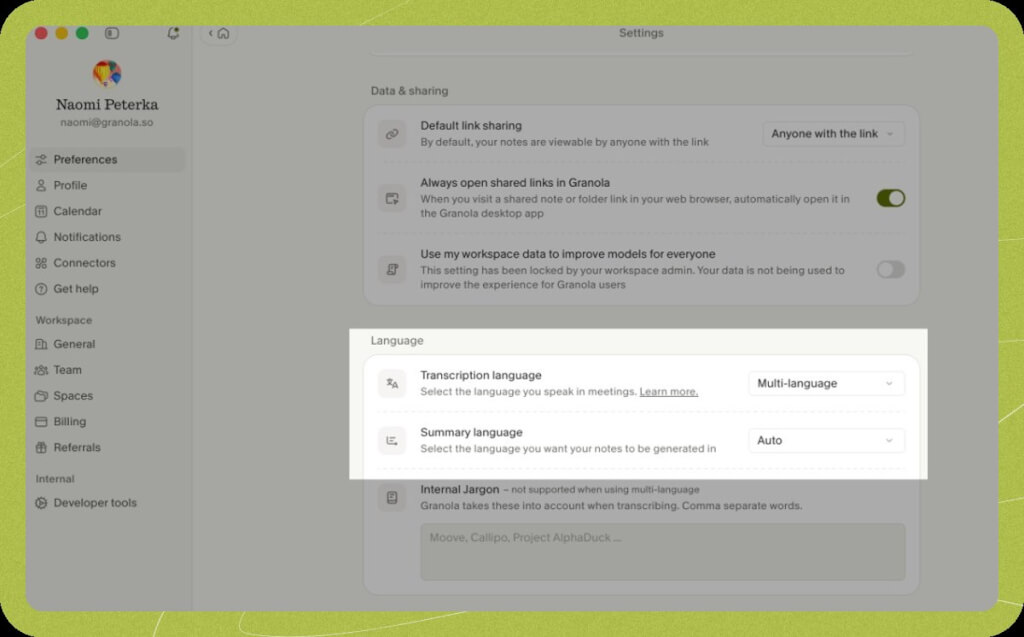
Before recording, make sure you’ve selected the correct microphone, especially when using Bluetooth headphones. The system audio from your computer will be captured along with the microphone, so music or other content played during the meeting may be included in the transcript; it’s best to pause any unrelated sounds beforehand. When using the feature for the first time, try a short meeting that doesn’t contain any sensitive information to get familiar with the process.
The Basic plan is free and offers essential features such as AI meeting notes, chat, and templates, with access to meeting history from the past 30 days. The Business plan is priced at $14 per user per month and offers unlimited meeting history and additional integrations; the Enterprise plan is priced at $35 per user per month and includes additional enterprise management capabilities. Specific billing cycles, taxes, and applicable terms are subject toOfficial Pricing PageSubject to the information on the checkout page.
Android is primarily used for in-person meetings and cannot directly transcribe phone calls or video conferences within other apps. iOS outbound call notes rely on Granola’s built-in dialing process, so not all calls can be transcribed. Granola Chat currently supports only iPhones on mobile devices; custom templates and many integrations still require processing on the desktop.Mobile HelpIt also explicitly states that Granola is not available on the Chinese App Store.
Real-time transcription relies on an online service, so an internet connection is required; it does not support direct import of existing audio files for transcription, nor does it provide post-meeting audio playback. Once transcription is complete, the audio is deleted, while text notes and transcripts are stored in the service. Free and Business users can disable the option to use anonymized data for model improvement in the settings. You should review your data sharing and storage settings before use, and exercise particular caution with sensitive meetings.Privacy and Data Statement
| Dimensions of Comparison | Granola | Superwhisper | Basic Voice Recorder App |
|---|---|---|---|
| Primary Focus | Meeting Notes and Communication Summaries | Speech Input and Text Processing | Save audio for easy playback |
| Typical Operations | Take shorthand notes during the meeting and generate the minutes afterward | Say the content, and it will be converted into text in the input field | Start recording, then edit it manually |
| Better-suited needs | Tracking Conference Decisions and Follow-up Actions | Writing messages, emails, and first drafts of documents | Prioritize preserving the original audio |
| Things to Consider Before Making a Choice | Historical Timeframes, Platform Differences, and Sharing Settings | Models, Plans, and Local or Cloud Processing Paths | Storage, Export, and Transcription Capabilities for Specific Applications |
If your main concern is “not being able to recall the discussion outcomes after the meeting,” Granola’s approach is better suited to your needs; if it’s “thinking fast but typing slowly,” voice-to-text tools are a more direct solution. If you need to save the original audio, you should choose a separate recording solution that allows playback and export.
Granola Official Download Page | iOS App Store (U.S.) | Android Google Play
Desktop and mobile features are subject to change with each version. Before installing, please verify the system requirements, your account region, and app store availability. Links to overseas app stores do not guarantee that the app can be installed directly or that the service can be accessed reliably in Mainland China.


 简体中文 简体中文
  English